
Terraform Tutorial : Introduction
Cloud computing has transformed the way organizations build and manage infrastructure. Companies no longer purchase and maintain large physical servers for every application. Instead, they use cloud platforms such as AWS, Azure, and Google Cloud to provision resources on demand.
However, managing cloud resources manually becomes difficult as infrastructure grows. Imagine creating hundreds of virtual machines, databases, storage buckets, security groups, and networking components manually through a cloud dashboard. The process becomes slow, error-prone, and difficult to maintain.
This is where Terraform becomes extremely valuable.
This Terraform Tutorial is designed to help beginners and experienced professionals understand Infrastructure as Code (IaC) and cloud automation. By the end of this Terraform Tutorial, you will understand how Terraform works, how to deploy cloud resources, how state management functions, and how organizations automate infrastructure deployments using Terraform.
Whether you are a DevOps Engineer, Cloud Engineer, System Administrator, or software developer, this Terraform Tutorial will provide practical knowledge that can be applied in real-world environments.
What is Terraform?
Terraform is an open-source Infrastructure as Code tool created by HashiCorp.
Terraform allows users to define infrastructure using code instead of manually creating resources through graphical interfaces.
Using Terraform, you can create:
- Virtual Machines
- Cloud Storage
- Kubernetes Clusters
- Databases
- Networking Resources
- Load Balancers
- Security Groups
- DNS Records
Terraform uses a declarative approach. Instead of defining step-by-step instructions, you define the desired state of infrastructure.
Terraform then determines how to achieve that desired state.
For example:
Instead of manually:
- Creating a VPC
- Creating subnets
- Launching EC2 instances
- Configuring security groups
You write Terraform code once and Terraform creates everything automatically.
This ability to automate infrastructure deployment is one reason why Terraform has become one of the most popular DevOps tools.
Why Learn Terraform?
Learning Terraform provides several career and technical benefits.
1. Infrastructure as Code
Infrastructure becomes version-controlled.
Changes can be tracked just like software code.
2. Automation
Terraform eliminates repetitive manual tasks.
3. Consistency
Every environment is created exactly the same way.
4. Faster Deployments
Entire infrastructures can be deployed in minutes.
5. Multi-Cloud Support
Terraform supports:
- AWS
- Azure
- Google Cloud
- Kubernetes
- VMware
- Oracle Cloud
6. High Industry Demand
Many organizations require Terraform skills for:
- DevOps Engineers
- Cloud Engineers
- Site Reliability Engineers
- Platform Engineers
A strong understanding of this Terraform Tutorial can significantly improve your employability in cloud and DevOps roles.
What is Infrastructure as Code (IaC)?
Infrastructure as Code is the process of managing infrastructure using code.
Traditionally, infrastructure was managed manually.
A system administrator would:
- Log into servers
- Configure resources manually
- Install software manually
- Create networking configurations manually
This approach causes problems:
- Human errors
- Inconsistent environments
- Slow deployments
- Difficult recovery processes
Infrastructure as Code solves these problems.
Benefits include:
Version Control
Infrastructure changes are stored in Git repositories.
Repeatability
Environments can be recreated consistently.
Automation
Infrastructure deployment becomes automated.
Collaboration
Teams can review infrastructure changes before deployment.
Disaster Recovery
Entire environments can be recreated quickly.
Infrastructure as Code is the foundation of modern DevOps practices, making it a critical topic in every Terraform Tutorial.
Terraform Architecture
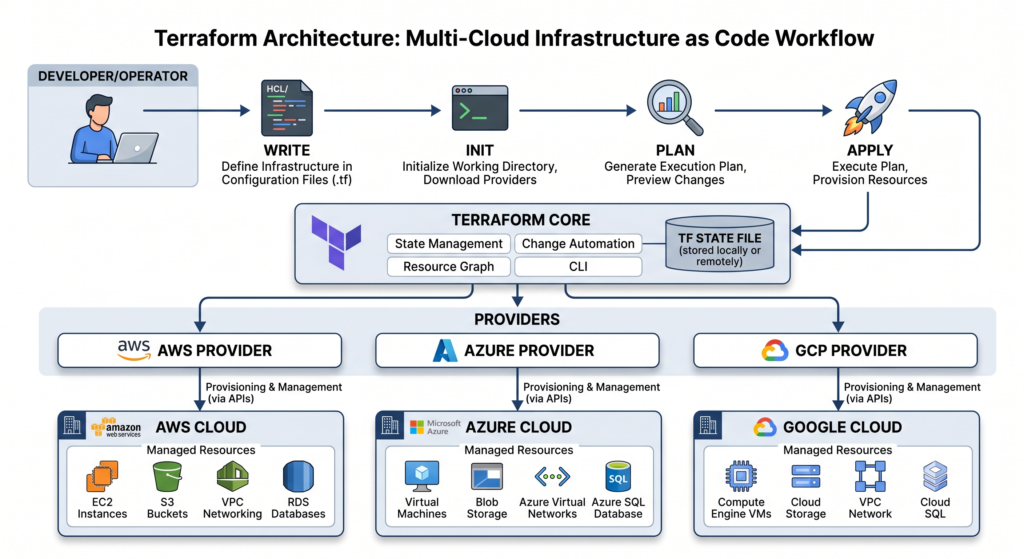
Terraform architecture contains two main components.
Terraform Core
Terraform Core is responsible for:
- Reading configuration files
- Managing state
- Creating execution plans
- Determining resource dependencies
Terraform Core compares:
Current State vs Desired State
It then calculates the required changes.
Providers
Providers act as plugins.
Providers allow Terraform to communicate with external platforms.
Examples include:
- AWS Provider
- Azure Provider
- Google Provider
- Kubernetes Provider
- Docker Provider
Providers translate Terraform commands into API calls that cloud platforms understand.
Without providers, Terraform would not be able to create infrastructure resources.
How Terraform Works
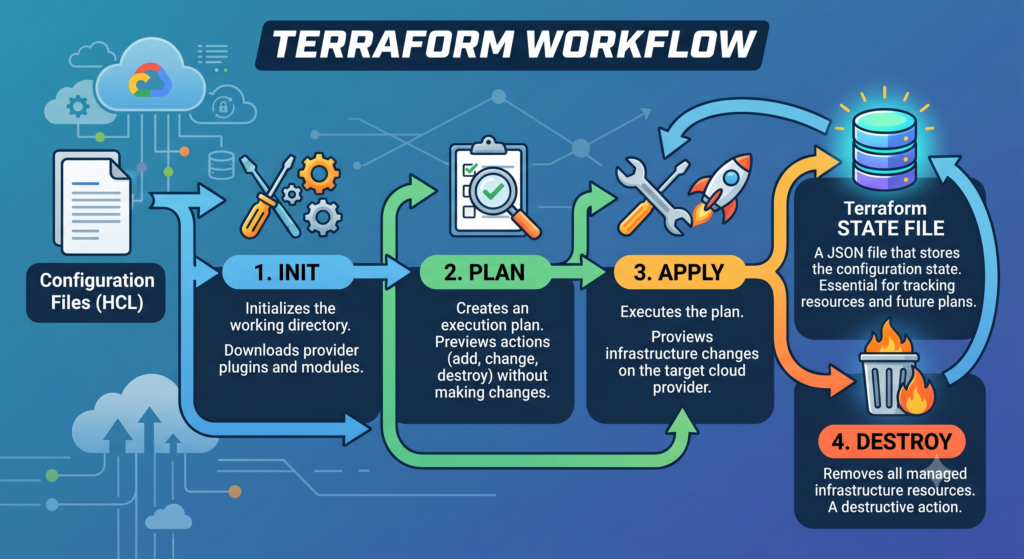
Terraform follows a simple workflow.
Step 1: Write Configuration
Create Terraform files using HCL (HashiCorp Configuration Language).
Step 2: Initialize Terraform
terraform init
Terraform downloads required providers.
Step 3: Validate Configuration
terraform validate
Terraform checks syntax.
Step 4: Generate Execution Plan
terraform plan
Terraform shows proposed changes.
Step 5: Apply Changes
terraform apply
Infrastructure is deployed.
Step 6: Destroy Infrastructure
terraform destroy
Resources are removed.
This workflow is one of the most important concepts covered in any Terraform Tutorial.
Installing Terraform
Windows Installation
- Visit HashiCorp website.
- Download Terraform.
- Extract ZIP file.
- Add Terraform to PATH.
- Verify installation.
terraform version
Linux Installation
sudo apt update
sudo apt install terraform
macOS Installation
brew tap hashicorp/tap
brew install hashicorp/tap/terraform
Verification:
terraform version
A successful installation confirms that Terraform is ready for use.
Terraform Configuration Files
Terraform uses HCL (HashiCorp Configuration Language) to define infrastructure resources.
A Terraform configuration file usually has a .tf extension.
Example:
resource "aws_instance" "web" {
  ami           = "ami-123456"
  instance_type = "t2.micro"
}
In this example:
resourcedefines a cloud resource.aws_instancespecifies the AWS EC2 resource type.webis the resource name.- The remaining parameters define configuration values.
Terraform reads these files and determines what resources must be created, modified, or deleted.
One reason this Terraform Tutorial is important is because configuration files become the foundation of Infrastructure as Code. Everything Terraform manages starts with configuration files.
Understanding Terraform Blocks
Terraform configurations contain several block types.
Resource Block
Defines infrastructure resources.
Example:
resource "aws_s3_bucket" "mybucket" {
 bucket = "terraform-demo-bucket"
}
Provider Block
Defines cloud providers.
Example:
provider "aws" {
 region = "ap-south-1"
}
Variable Block
Stores reusable values.
Example:
variable "instance_type" {
 default = "t2.micro"
}
Output Block
Displays values after deployment.
Example:
output "public_ip" {
 value = aws_instance.web.public_ip
}
Understanding these blocks is essential for mastering this Terraform Tutorial.
Terraform Providers
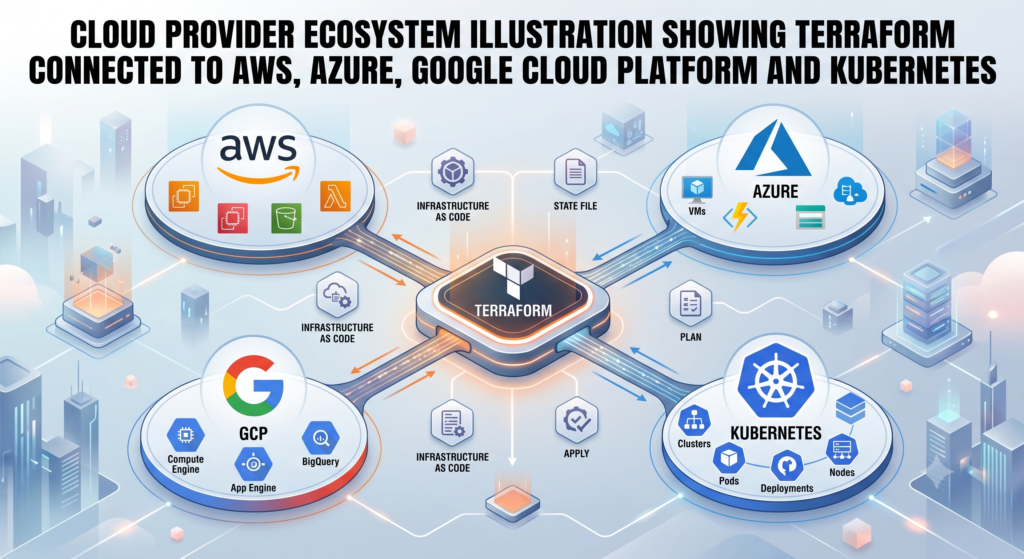
Providers are responsible for communicating with cloud platforms and external services.
Terraform itself cannot create resources directly.
Instead, it uses providers to interact with APIs.
Popular providers include:
AWS Provider
Used to manage AWS services such as:
- EC2
- S3
- VPC
- RDS
- IAM
Azure Provider
Used to manage:
- Virtual Machines
- Resource Groups
- Storage Accounts
Google Cloud Provider
Used to manage:
- Compute Engine
- Cloud Storage
- GKE Clusters
Kubernetes Provider
Used to manage Kubernetes resources.
Docker Provider
Used to manage Docker containers and images.
Providers make Terraform flexible enough to support thousands of resource types across different platforms.
Terraform State File
One of the most important topics in this Terraform Tutorial is the Terraform State File.
Terraform maintains a file called:
terraform.tfstate
This file stores information about infrastructure resources managed by Terraform.
Terraform uses the state file to understand:
- What resources already exist
- What changes are required
- Resource dependencies
- Resource IDs
Without a state file, Terraform would not know the current state of infrastructure.
Why State Files Matter
Suppose you create:
- 10 EC2 instances
- 3 databases
- 5 load balancers
Terraform records all of this information in the state file.
Later, when changes occur, Terraform compares:
Current State → Desired State
and calculates required modifications.
Problems with Local State Files
Local state files create challenges:
- Team conflicts
- Security concerns
- State corruption
- Lack of collaboration
Remote State Storage
Production environments typically store state remotely.
Common options:
- AWS S3
- Azure Blob Storage
- Google Cloud Storage
- Terraform Cloud
State File Best Practices
- Never commit state files to Git
- Use remote state storage
- Enable state locking
- Encrypt state data
- Backup state regularly
Many Terraform deployment failures occur because teams ignore proper state management.
Terraform Variables
Variables improve flexibility and reusability.
Instead of hardcoding values, variables allow dynamic configuration.
Example:
variable "instance_type" {
 default = "t2.micro"
}
Usage:
resource "aws_instance" "web" {
 instance_type = var.instance_type
}
Benefits of Variables
Reusability
Same code works in multiple environments.
Flexibility
Change values without modifying resource definitions.
Maintainability
Configurations become easier to manage.
Types of Variables
String
variable "environment" {
 type = string
}
Number
variable "server_count" {
 type = number
}
Boolean
variable "enable_backup" {
 type = bool
}
List
variable "subnets" {
 type = list(string)
}
Variables are heavily used in enterprise Terraform projects.
Terraform Outputs
Outputs display useful information after deployment.
Example:
output "instance_public_ip" {
 value = aws_instance.web.public_ip
}
After deployment:
instance_public_ip = 54.210.xx.xx
Outputs are commonly used for:
- Public IP addresses
- DNS names
- Database endpoints
- Resource IDs
Outputs simplify integration between Terraform and CI/CD pipelines.
Terraform Locals
Locals allow reusable expressions within Terraform.
Example:
locals {
 environment = "production"
}
Usage:
tags = {
 Environment = local.environment
}
Benefits:
- Cleaner code
- Reduced duplication
- Improved readability
Large organizations often combine variables and locals to standardize infrastructure deployments.
Terraform Modules
As Terraform projects grow, configuration files become difficult to manage.
Modules solve this problem.
A module is a reusable collection of Terraform resources.
Think of a module as a reusable package.
Example Structure
modules/
 ├── network
 ├── compute
 ├── database
Network Module
Creates:
- VPC
- Subnets
- Route Tables
Compute Module
Creates:
- EC2 Instances
- Auto Scaling Groups
Database Module
Creates:
- RDS
- Aurora
- Security Groups
Benefits of Modules
Reusability
Write once and reuse everywhere.
Standardization
All teams follow the same infrastructure standards.
Scalability
Large projects become manageable.
Maintenance
Updates occur in one place.
Modules are a critical topic in advanced Terraform Tutorial learning paths.
Terraform Workspaces
Workspaces allow multiple environments using the same configuration.
Examples:
- Development
- Testing
- Staging
- Production
Create workspace:
terraform workspace new dev
List workspaces:
terraform workspace list
Switch workspace:
terraform workspace select prod
Benefits:
- Environment separation
- Reduced duplication
- Easier management
Workspaces are useful for organizations managing multiple deployment environments.
Terraform Dependency Management
Terraform automatically determines dependencies.
Example:
resource "aws_security_group" "web" {}

resource "aws_instance" "server" {
 security_groups = [aws_security_group.web.name]
}
Terraform understands:
Security Group → EC2 Instance
and deploys resources in the correct order.
Explicit Dependencies
Sometimes dependencies must be defined manually.
depends_on = [
 aws_security_group.web
]
Dependency management prevents deployment failures and ensures resources are created correctly.
Terraform Functions
Terraform includes built-in functions.
Length Function
length(var.subnets)
Upper Function
upper("terraform")
Lower Function
lower("TERRAFORM")
Join Function
join(",", var.subnets)
Functions improve flexibility and reduce repetitive code.
Terraform Data Sources
Data sources allow Terraform to retrieve existing resources.
Example:
data "aws_ami" "latest" {
 most_recent = true
}
Benefits:
- Reuse existing infrastructure
- Dynamic configurations
- Reduced hardcoding
Data sources are commonly used in production-grade Terraform deployments.
Terraform Lifecycle Rules
Lifecycle rules control resource behavior.
Example:
lifecycle {
 create_before_destroy = true
}
Benefits:
- Minimize downtime
- Safer updates
- Controlled resource replacement
Lifecycle settings become increasingly important in large-scale cloud environments.
Terraform with AWS
AWS is the most popular cloud platform used with Terraform. Many organizations adopt Terraform because it enables consistent and automated deployment of AWS resources.
A typical AWS infrastructure may include:
- VPC
- Subnets
- EC2 Instances
- Security Groups
- IAM Roles
- Load Balancers
- S3 Buckets
- RDS Databases
Configure AWS Provider
provider "aws" {
  region = "ap-south-1"
}
Create an EC2 Instance
resource "aws_instance" "webserver" {
  ami           = "ami-xxxxxxxx"
  instance_type = "t2.micro"
}
Create an S3 Bucket
resource "aws_s3_bucket" "storage" {
  bucket = "terraform-demo-storage"
}
Create a Security Group
resource "aws_security_group" "web" {
  name = "web-security-group"
}
When learning Terraform, AWS is usually the first cloud platform engineers start with because of its massive adoption across the industry.
Terraform with Azure
Microsoft Azure is another major cloud provider supported by Terraform.
Terraform allows Azure engineers to automate infrastructure deployment without relying on manual portal operations.
Azure Resources Managed by Terraform
- Virtual Machines
- Virtual Networks
- Resource Groups
- Load Balancers
- Azure Kubernetes Service (AKS)
- Storage Accounts
Azure Provider Example
provider "azurerm" {
 features {}
}
Create Resource Group
resource "azurerm_resource_group" "demo" {
 name     = "terraform-rg"
 location = "Central India"
}
Benefits of Using Terraform with Azure
- Faster deployments
- Consistent infrastructure
- Better governance
- Infrastructure version control
- Simplified environment management
Organizations running hybrid cloud environments often use Terraform because it supports both Azure and AWS using the same workflow.
Terraform with Google Cloud Platform (GCP)
Google Cloud Platform provides powerful services for modern cloud-native applications.
Terraform supports almost every major GCP service.
Common GCP Resources
- Compute Engine
- Cloud Storage
- VPC Networks
- Cloud SQL
- GKE Clusters
- Load Balancers
Configure GCP Provider
provider "google" {
 project = "my-project"
 region  = "asia-south1"
}
Create Storage Bucket
resource "google_storage_bucket" "demo" {
 name = "terraform-demo-bucket"
}
Terraform enables organizations to manage AWS, Azure, and Google Cloud from a single Infrastructure as Code platform.
Terraform with Kubernetes
Modern applications increasingly run on Kubernetes.
Terraform helps automate Kubernetes cluster provisioning and resource deployment.
What Can Terraform Manage?
- Namespaces
- Deployments
- Services
- ConfigMaps
- Secrets
- Ingress Resources
Namespace Example
resource "kubernetes_namespace" "production" {
 metadata {
   name = "production"
 }
}
Benefits of Terraform with Kubernetes
Infrastructure and Application Consistency
Clusters and resources can be managed using the same workflow.
Faster Deployment
Entire Kubernetes environments can be provisioned automatically.
Better Governance
Infrastructure changes become auditable.
Many DevOps teams combine:
- Docker
- Kubernetes
- Terraform
to build scalable cloud-native environments.
Terraform and CI/CD Pipelines
Terraform integrates extremely well with CI/CD pipelines.
Organizations often automate Terraform execution whenever code changes are pushed to Git repositories.
Popular CI/CD Platforms
- GitHub Actions
- Jenkins
- GitLab CI/CD
- Azure DevOps
- CircleCI
Typical Workflow
- Developer updates Terraform code.
- Code pushed to Git repository.
- Pipeline executes Terraform validation.
- Terraform plan generated.
- Approval process triggered.
- Terraform apply executed.
- Infrastructure updated automatically.
Benefits include:
- Faster delivery
- Reduced manual effort
- Better compliance
- Repeatable deployments
This is one of the most valuable practical applications covered in this Terraform Tutorial.
Real-World Terraform Project Example
Let’s consider a production-ready web application.
Infrastructure Requirements
- VPC
- Public Subnet
- Private Subnet
- Internet Gateway
- EC2 Instances
- Load Balancer
- Database
- Monitoring
Manual Deployment Approach
Without Terraform:
- Log into AWS Console
- Create networking resources
- Configure security groups
- Launch servers
- Configure load balancer
- Configure database
This process may take several hours.
Terraform Approach
Terraform configuration files define everything.
Deployment:
terraform init
terraform plan
terraform apply
Within minutes:
- Network created
- Servers deployed
- Database configured
- Load balancer attached
This is why Terraform has become a standard tool in DevOps environments.
Terraform Best Practices
Use Remote State
Avoid local state files in team environments.
Recommended options:
- AWS S3
- Azure Storage
- Terraform Cloud
Follow Naming Standards
Consistent naming improves management.
Example:
prod-web-server
dev-database
test-load-balancer
Separate Environments
Create dedicated environments:
- Development
- Staging
- Production
Use Modules
Avoid copy-pasting infrastructure code.
Review Terraform Plans
Always run:
terraform plan
before applying changes.
Secure Sensitive Data
Never hardcode:
- Passwords
- Access Keys
- Secrets
Use secret management solutions instead.
Store Code in Git
Infrastructure code should always be version controlled.
Following these practices will help ensure successful Terraform adoption.
Common Terraform Mistakes Beginners Make
Skipping Terraform Plan
Applying changes without reviewing plans can create unexpected resources.
Ignoring State Files
Improper state management causes deployment issues.
Hardcoding Values
Makes infrastructure difficult to maintain.
Not Using Modules
Results in duplicated code.
Mixing Environments
Development and production should remain isolated.
Committing Secrets to Git
A surprisingly common mistake. Humans remain endlessly creative when inventing new ways to expose credentials.
Avoiding these mistakes will accelerate your Terraform learning journey.
Terraform Interview Questions
What is Terraform?
Terraform is an Infrastructure as Code tool used to automate infrastructure provisioning.
What is a Provider?
A provider enables Terraform to interact with external platforms.
What is Terraform State?
Terraform state stores information about managed infrastructure resources.
What is Terraform Plan?
Terraform Plan shows changes before deployment.
What is Terraform Apply?
Terraform Apply executes infrastructure changes.
What is Terraform Destroy?
Terraform Destroy removes infrastructure resources.
What are Modules?
Reusable collections of Terraform resources.
Difference Between Terraform and CloudFormation?
Terraform supports multiple cloud providers, while CloudFormation focuses on AWS.
What are Workspaces?
Workspaces allow multiple environments using the same Terraform configuration.
Why Use Infrastructure as Code?
Infrastructure as Code improves consistency, automation, and repeatability.
Terraform Career Opportunities
Terraform skills are highly valued in today’s job market.
DevOps Engineer
Responsibilities:
- Infrastructure automation
- CI/CD implementation
- Cloud deployments
Cloud Engineer
Responsibilities:
- Cloud architecture
- Resource management
- Infrastructure optimization
Site Reliability Engineer (SRE)
Responsibilities:
- Reliability engineering
- Automation
- Monitoring
Platform Engineer
Responsibilities:
- Internal developer platforms
- Infrastructure standardization
Infrastructure Engineer
Responsibilities:
- Infrastructure provisioning
- Cloud migration
- Automation
Companies actively hiring Terraform professionals include:
- Amazon
- Microsoft
- IBM
- Deloitte
- Accenture
- Infosys
- TCS
- Wipro
- Cognizant
Terraform Learning Roadmap
Week 1
- Terraform Basics
- HCL Syntax
- Resources
- Providers
Week 2
- Variables
- Outputs
- State Files
Week 3
- Modules
- Workspaces
- Functions
Week 4
- AWS Deployment
- Azure Deployment
- GCP Deployment
Week 5
- Kubernetes Integration
- Docker Integration
- CI/CD Pipelines
Week 6
- Real Projects
- Production Deployments
- Interview Preparation
Following this roadmap provides a structured path for mastering Terraform.
Read our more searched Blogs
Add these internal links naturally within your website:
- DevOps Roadmap
- AWS Tutorial
- Docker Tutorial
- Kubernetes Tutorial
- Git and GitHub Tutorial
- CI/CD Pipeline Guide
- Linux Tutorial
- Cloud Computing Roadmap
These internal links help improve SEO and increase user engagement.
External Resources
Official Terraform Documentation:
https://developer.hashicorp.com/terraform
AWS Documentation:
Microsoft Azure:
Google Cloud:
Referencing authoritative resources strengthens topical authority and user trust.
Conclusion
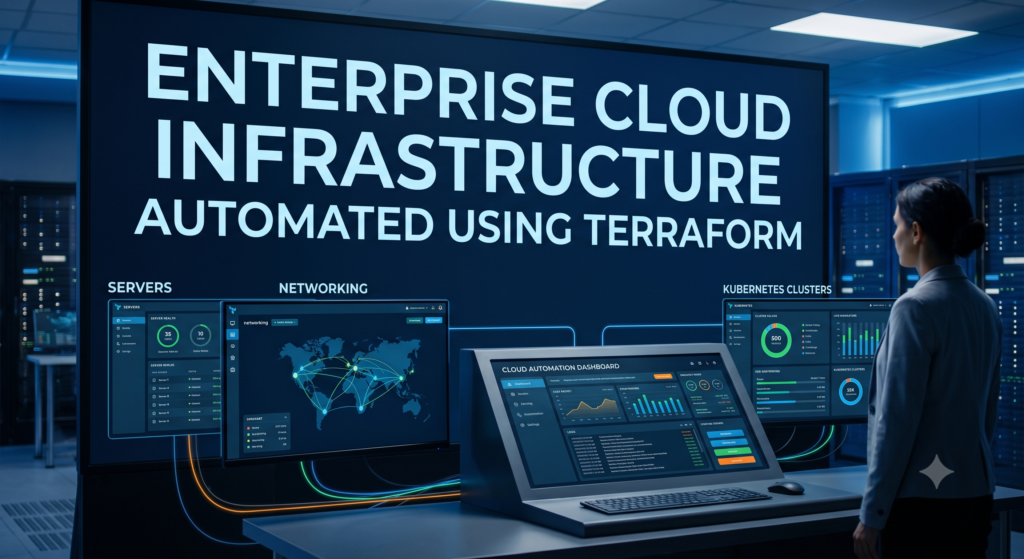
Terraform has transformed the way organizations manage infrastructure. Instead of manually creating cloud resources, engineers can define infrastructure using code and automate deployments across multiple cloud providers.
This Terraform Tutorial covered Infrastructure as Code fundamentals, Terraform architecture, providers, state management, variables, outputs, modules, workspaces, AWS deployments, Azure deployments, Google Cloud deployments, Kubernetes integration, CI/CD automation, best practices, and real-world implementation strategies.
As cloud adoption continues to grow, Terraform remains one of the most valuable skills for DevOps Engineers, Cloud Engineers, Platform Engineers, and Site Reliability Engineers.
By consistently practicing the concepts discussed in this Terraform Tutorial and building real-world projects, you can develop production-ready Infrastructure as Code skills that are highly sought after in the technology industry.
Frequently Asked Questions (FAQ)
Is Terraform free?
Yes. Terraform Open Source is free to use.
Is Terraform easy to learn?
Yes. Beginners can learn the fundamentals within a few weeks.
Do DevOps Engineers use Terraform?
Yes. Terraform is one of the most widely used Infrastructure as Code tools in DevOps.
Can Terraform manage Kubernetes?
Yes. Terraform can provision and manage Kubernetes resources.
Is Terraform better than CloudFormation?
Terraform supports multiple cloud providers, making it more flexible in multi-cloud environments.
How long does it take to learn Terraform?
Most learners can understand Terraform fundamentals within two to four weeks with consistent practice.
What should I learn after Terraform?
Recommended next topics:
• Docker
• Kubernetes
• AWS
• Linux
• Git and GitHub
• CI/CD Pipelines
• Monitoring Tools
Is Terraform useful for beginners?
Absolutely. Terraform provides an excellent introduction to Infrastructure as Code and cloud automation concepts.
Does Terraform require programming knowledge?
Basic scripting knowledge helps, but deep programming experience is not mandatory.
Is Terraform still in demand in 2026?
Yes. Terraform remains one of the most in-demand Infrastructure as Code tools used across cloud and DevOps ecosystems.