
Introduction
If you’re trying to become a DevOps Engineer, learning tools alone won’t get you hired. You can spend months watching videos about Docker, Kubernetes, Jenkins, AWS, Terraform, Git, Linux, and CI/CD, but recruiters and hiring managers almost always ask the same question:
“What projects have you built?”
That single question separates learners from professionals.
Working on DevOps Projects for Beginners is the fastest way to understand how different DevOps tools fit together in real-world software development. Instead of learning Docker, Kubernetes, Jenkins, Terraform, GitHub Actions, and AWS separately, projects teach you how these technologies work together to automate software delivery.
Whether you’re a college student, career switcher, or software developer moving into DevOps, building hands-on projects will improve your understanding of cloud infrastructure, automation, deployment, monitoring, and continuous integration.
In this guide, you’ll discover the 15 best DevOps Projects for Beginners, the tools you’ll use, the skills you’ll gain, and how each project strengthens your portfolio.
By the end of this article, you’ll have a complete roadmap for becoming job-ready with practical DevOps experience.
Why Build DevOps Projects?
Most beginners spend too much time collecting certificates.
Certificates demonstrate learning.
Projects demonstrate ability.
Employers trust practical experience because it shows you can solve real problems instead of simply memorizing concepts.
Building DevOps Projects for Beginners helps you:
- Learn faster through practice
- Understand CI/CD pipelines
- Master Linux commands
- Improve Git workflow
- Deploy applications to the cloud
- Gain Docker and Kubernetes experience
- Learn Infrastructure as Code
- Build an impressive GitHub portfolio
- Prepare for technical interviews
- Increase job opportunities
Every completed project becomes proof of your skills.
Skills You’ll Learn
Working on these projects helps you master multiple technologies simultaneously.
| Skill | Why It Matters |
|---|---|
| Linux | Foundation of DevOps |
| Git | Version Control |
| GitHub | Code Collaboration |
| Docker | Containerization |
| Kubernetes | Container Orchestration |
| Jenkins | CI/CD Automation |
| Terraform | Infrastructure as Code |
| AWS | Cloud Deployment |
| Monitoring | Production Health |
| Bash Scripting | Automation |
These skills are commonly listed in DevOps job descriptions.
Project 1: Host a Static Website on AWS
Difficulty
Beginner
Tools
- AWS EC2
- Nginx
- Linux
- Git
Project Overview
Deploy a simple HTML, CSS, and JavaScript website on an AWS EC2 instance.
This project introduces Linux administration, SSH, web servers, cloud deployment, and networking.
You’ll Learn
- Launch EC2 instances
- Connect using SSH
- Install Nginx
- Configure Security Groups
- Upload website files
- Configure DNS (optional)
Resume Value
This project proves that you understand cloud deployment fundamentals.
Project 2: Dockerize a Node.js Application
One of the best DevOps Projects for Beginners is containerizing an application using Docker.
Instead of installing dependencies manually, Docker packages everything into a portable container.
Tools
- Docker
- Node.js
- Express
- Docker Hub
Tasks
- Write Dockerfile
- Build Docker Image
- Run Docker Container
- Push Image to Docker Hub
- Test Container
Skills Learned
- Docker Images
- Docker Containers
- Docker Volumes
- Docker Networks
- Docker Registry
Project 3: Build a CI/CD Pipeline Using Jenkins
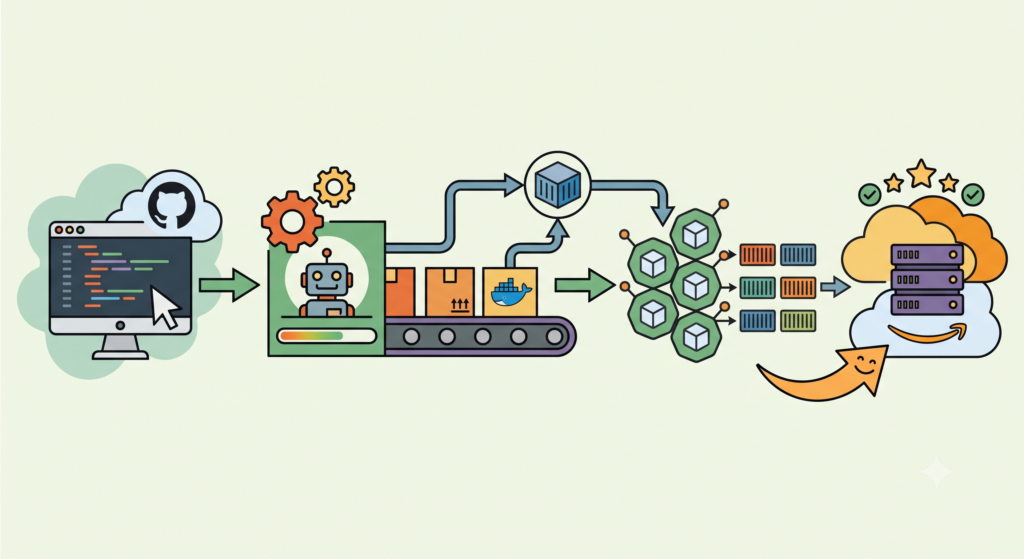
Continuous Integration and Continuous Delivery are essential DevOps practices.
This project automatically builds and deploys applications whenever code changes are pushed to GitHub.
Tools
- Jenkins
- GitHub
- Docker
- Linux
Pipeline Flow
Developer
↓
GitHub Push
↓
Jenkins Build
↓
Run Tests
↓
Create Docker Image
↓
Deploy
This is one of the most recommended DevOps Projects for Beginners because it teaches automation.
Project 4: Deploy Docker Containers Using Docker Compose
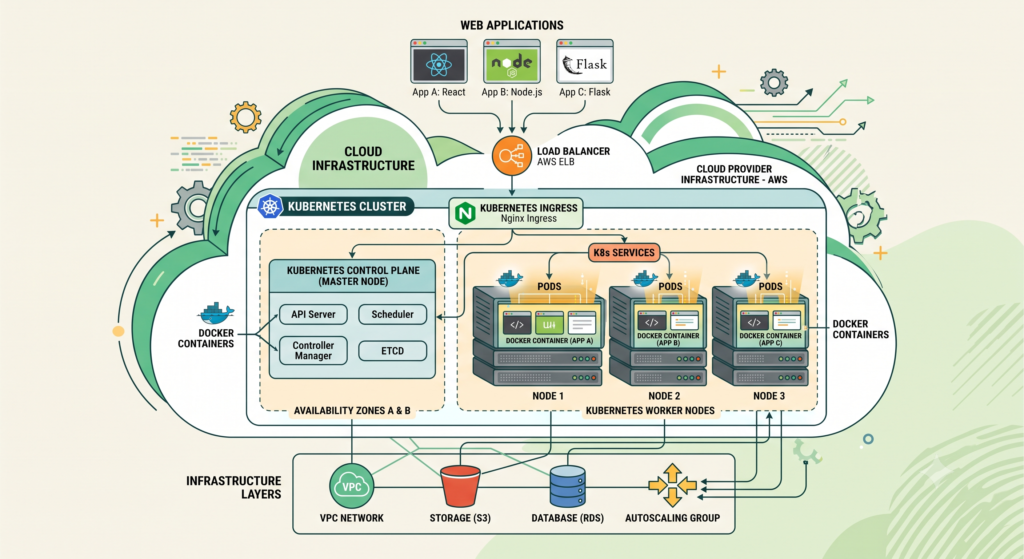
As applications grow, managing multiple containers manually becomes difficult.
Docker Compose simplifies this process.
Example Stack
- Node.js
- MongoDB
- Redis
- Nginx
Instead of starting each container individually, Docker Compose launches the entire application with one command:
docker-compose up -d
Skills Learned
- YAML configuration
- Multi-container applications
- Environment variables
- Persistent storage
- Service communication
Project 5: Kubernetes Deployment Project
After learning Docker, the next logical step is Kubernetes.
Kubernetes manages containers automatically and ensures applications remain available even when failures occur.
Tools
- Minikube
- Kubernetes
- Docker
Learn
- Pods
- ReplicaSets
- Services
- Deployments
- ConfigMaps
- Secrets
This is among the most valuable DevOps Projects for Beginners because Kubernetes is now a standard requirement for many DevOps roles.
Project 6: Infrastructure as Code Using Terraform
Instead of manually creating cloud resources, Terraform automates everything.
Resources to Create
- EC2 Instance
- Security Group
- VPC
- Subnets
- Internet Gateway
Benefits
- Faster deployments
- Version-controlled infrastructure
- Easy rollback
- Reusable configurations
Skills Learned
- Terraform Providers
- Variables
- State Files
- Modules
- Resource Management
Terraform is one of the most sought-after DevOps tools today. Learning Infrastructure as Code through real DevOps Projects for Beginners gives you a significant advantage when applying for cloud and DevOps positions.
Why These First Six Projects Matter
These six projects form the foundation of every successful DevOps career. They introduce cloud computing, containerization, automation, orchestration, and Infrastructure as Code.
Once you complete these projects, you’ll have practical experience with:
- AWS Cloud
- Linux Administration
- Docker
- Kubernetes
- Jenkins
- Terraform
- GitHub
- CI/CD Pipelines
Together, these skills create a strong base for more advanced DevOps projects and real-world enterprise environments.
Project 7: Build a Complete CI/CD Pipeline Using GitHub Actions
GitHub Actions has become one of the most popular CI/CD platforms because it is tightly integrated with GitHub repositories. Every DevOps engineer should understand how to automate builds, tests, and deployments using workflows.
This is one of the most practical DevOps Projects for Beginners because it requires no additional CI/CD server.
Tools
- GitHub
- GitHub Actions
- Docker
- AWS EC2
- Node.js
Objectives
- Create a GitHub repository
- Build the application automatically
- Run automated tests
- Build a Docker image
- Push the image to Docker Hub
- Deploy the application to AWS
Skills You’ll Learn
- Workflow automation
- YAML syntax
- GitHub Secrets
- Automated deployments
- Docker integration
Project 8: Monitor Applications Using Prometheus and Grafana
Monitoring is one of the most important responsibilities of a DevOps Engineer. Without monitoring, you won’t know if your application is healthy until users begin complaining. Humans are remarkably efficient at discovering bugs, usually by paying customers.
Tools
- Prometheus
- Grafana
- Docker
- Node Exporter
Project Overview
Install Prometheus to collect system metrics and Grafana to visualize CPU usage, memory utilization, disk space, and network traffic.
Metrics to Monitor
- CPU Utilization
- Memory Usage
- Disk Usage
- Network Traffic
- Container Health
- Server Uptime
Skills You’ll Gain
- Metrics collection
- Dashboard creation
- Alert configuration
- Infrastructure monitoring
Monitoring projects are among the most valuable DevOps Projects for Beginners because every production environment requires visibility into system health.
Project 9: Centralized Logging Using the ELK Stack
Logs are essential for debugging production issues. Instead of logging into multiple servers individually, centralized logging collects everything in one location.
Tools
- Elasticsearch
- Logstash
- Kibana
- Filebeat
- Docker
Project Tasks
- Install Elasticsearch
- Configure Logstash pipelines
- Collect server logs
- Visualize logs in Kibana
- Search application errors
Benefits
- Faster troubleshooting
- Centralized log management
- Improved security auditing
- Better application visibility
Project 10: Automate Server Configuration with Ansible
Server configuration becomes repetitive when managing multiple machines. Ansible automates these tasks without requiring agents.
Tools
- Ansible
- Linux
- AWS EC2
Tasks
- Install Apache automatically
- Create users
- Configure firewall
- Deploy application files
- Restart services
Skills Learned
- Playbooks
- Inventory Files
- Roles
- Variables
- Idempotent automation
Among all DevOps Projects for Beginners, this project demonstrates how automation reduces manual effort and minimizes configuration errors.
Project 11: Deploy a Three-Tier Application
This project combines everything you’ve learned so far into a realistic deployment.
Architecture
Frontend
↓
Backend API
↓
Database
Technologies
- React
- Node.js
- MongoDB
- Docker
- Docker Compose
- Nginx
Objectives
- Containerize each service
- Configure networking
- Manage environment variables
- Enable persistent storage
- Deploy the entire stack
Skills Developed
- Microservices architecture
- Container orchestration
- Reverse proxy configuration
- Service communication
Project 12: Deploy a Kubernetes Cluster on AWS
After learning Minikube, move to a real cloud environment.
Tools
- AWS EKS
- kubectl
- Docker
- Kubernetes
Learn
- Worker Nodes
- Load Balancers
- Auto Scaling
- Namespaces
- Ingress Controllers
- Rolling Updates
This project demonstrates enterprise-level Kubernetes deployment and strengthens your portfolio significantly.
Common Mistakes Beginners Make
Many learners delay building projects because they believe they need to master every DevOps tool first. In reality, projects are how mastery develops.
Avoid these mistakes:
- Watching endless tutorials without building
- Skipping Linux fundamentals
- Ignoring Git version control
- Not documenting projects on GitHub
- Deploying only locally
- Forgetting to write README files
- Avoiding cloud platforms due to fear of costs
- Not troubleshooting errors independently
Remember, debugging is part of the learning process. Every experienced DevOps engineer has spent hours chasing a missing semicolon, a mistyped YAML indentation, or a forgotten security group rule.
Best Free Resources
You can build these projects using free resources.
Cloud Platforms
Development Tools
- Docker Desktop
- Git
- Visual Studio Code
- Minikube
- VirtualBox
- Terraform
- Jenkins
These tools are sufficient to complete most DevOps Projects for Beginners without significant investment.
Project 13: Automate Infrastructure Deployment with Terraform and AWS
Once you’ve learned the basics of Terraform, challenge yourself by creating an entire AWS infrastructure from code. This project closely resembles how modern companies manage cloud environments.
Tools
- Terraform
- AWS
- GitHub
- Visual Studio Code
Infrastructure to Create
- VPC
- Public and Private Subnets
- Internet Gateway
- Route Tables
- Security Groups
- EC2 Instances
- S3 Bucket
What You’ll Learn
- Infrastructure as Code (IaC)
- Terraform Modules
- State Management
- Remote Backend
- Resource Dependencies
- Reusable Infrastructure
Among all DevOps Projects for Beginners, this project provides excellent experience with cloud automation and Infrastructure as Code, both of which are highly valued in DevOps interviews.
Project 14: Build an End-to-End DevOps Pipeline
This project combines nearly every major DevOps tool into one complete workflow.
Technologies Used
- GitHub
- Jenkins
- Docker
- Kubernetes
- Terraform
- AWS
- Prometheus
- Grafana
Project Workflow
Developer Writes Code
↓
Pushes Code to GitHub
↓
Jenkins Detects Changes
↓
Application Builds Automatically
↓
Automated Tests Execute
↓
Docker Image is Created
↓
Image is Pushed to Docker Hub
↓
Terraform Creates Infrastructure
↓
Application Deploys to Kubernetes
↓
Prometheus Collects Metrics
↓
Grafana Displays Dashboards
This project demonstrates the complete DevOps lifecycle from development to deployment and monitoring.
Skills You’ll Gain
- CI/CD Pipeline Design
- Cloud Infrastructure Automation
- Kubernetes Deployment
- Monitoring and Observability
- Production Readiness
This is one of the most impressive DevOps Projects for Beginners because it showcases how multiple technologies work together in real-world environments.
Project 15: Create Your Own DevOps Portfolio Website
A portfolio website helps recruiters evaluate your practical experience before they even schedule an interview.
Include
- Personal Introduction
- Technical Skills
- GitHub Repository Links
- Project Screenshots
- Architecture Diagrams
- Resume Download
- Contact Information
- LinkedIn Profile
Recommended Technologies
- HTML
- CSS
- JavaScript
- React
- Nginx
- AWS S3
- CloudFront
A professional portfolio makes your DevOps Projects for Beginners easily accessible and demonstrates your communication skills.
Recommended GitHub Repository Structure
Organize every project professionally.
DevOps-Projects/
│
├── Project-1-AWS-Website/
├── Project-2-Docker/
├── Project-3-Jenkins/
├── Project-4-DockerCompose/
├── Project-5-Kubernetes/
├── Project-6-Terraform/
├── Project-7-GitHub-Actions/
├── Project-8-Prometheus-Grafana/
├── Project-9-ELK/
├── Project-10-Ansible/
├── Project-11-Three-Tier-App/
├── Project-12-EKS/
├── Project-13-Terraform-AWS/
├── Project-14-End-to-End-Pipeline/
└── Project-15-Portfolio/
Each repository should include:
- README.md
- Architecture Diagram
- Deployment Steps
- Screenshots
- Source Code
- Configuration Files
A well-documented GitHub repository can leave a stronger impression than a long list of certificates.
How to Showcase Your Projects on Your Resume
When adding DevOps Projects for Beginners to your resume, don’t simply list the project names. Highlight the technologies used and measurable outcomes.
Example
Automated CI/CD Pipeline Using Jenkins
- Built an automated CI/CD pipeline using Jenkins and GitHub.
- Containerized the application using Docker.
- Reduced deployment time through automation.
- Hosted the application on AWS EC2.
This format is concise, professional, and demonstrates practical experience.
Tips for Completing DevOps Projects Successfully
- Start with one project at a time.
- Document every step.
- Push your code to GitHub regularly.
- Learn from debugging instead of avoiding it.
- Use the AWS Free Tier whenever possible.
- Practice Linux commands daily.
- Understand the purpose of each tool rather than memorizing commands.
- Add screenshots and architecture diagrams to your documentation.
Consistency matters more than speed. Building fifteen small projects is often more valuable than abandoning one massive project halfway through.
Frequently Asked Questions (FAQs)
1. Are DevOps projects necessary to get a job?
Yes. Practical projects demonstrate your ability to use DevOps tools in real-world scenarios and strengthen your resume significantly.
2. Which is the best DevOps project for beginners?
A Dockerized application deployed to AWS with a Jenkins CI/CD pipeline is an excellent starting project because it introduces cloud computing, automation, and containerization.
3. Can I build these projects using free tools?
Yes. Most of these projects can be completed using the AWS Free Tier, Docker Desktop, GitHub, Minikube, Terraform, Jenkins, and other free or open-source tools.
4. How many DevOps projects should I include in my portfolio?
Aim for at least 8 to 10 well-documented projects. Quality and documentation matter more than quantity.
5. Do recruiters check GitHub repositories?
Many recruiters and hiring managers review GitHub profiles, especially for technical roles. A clean repository with detailed documentation can significantly improve your chances.
Conclusion
Learning DevOps is not just about reading documentation or completing online courses. Practical experience is what transforms theoretical knowledge into real-world skills.
By working through these DevOps Projects for Beginners, you’ll gain hands-on experience with Linux, Git, Docker, Kubernetes, Jenkins, Terraform, AWS, monitoring tools, logging platforms, and Infrastructure as Code. More importantly, you’ll understand how these technologies integrate to automate software delivery and infrastructure management.
Each completed project adds value to your GitHub profile, strengthens your resume, and builds confidence for technical interviews. Start with simple projects such as deploying a static website or containerizing an application, then gradually progress to advanced workflows involving Kubernetes, Terraform, and complete CI/CD pipelines.
The demand for skilled DevOps engineers continues to grow, and employers increasingly prioritize candidates who can demonstrate practical expertise. Building and documenting these DevOps Projects for Beginners is one of the most effective ways to stand out in a competitive job market.
The best time to start building your first project is today. Every project you complete brings you one step closer to becoming a confident and job-ready DevOps engineer.