
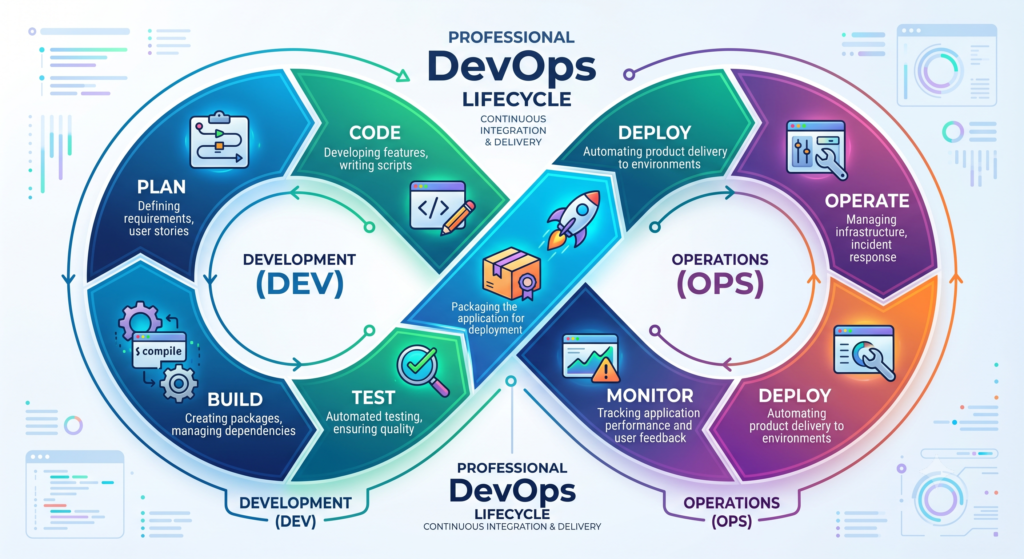
Cloud-native development, DevOps practices, and automation have completely transformed how software is built and delivered. Gone are the days when developers wrote code for months and released updates once or twice a year. Modern organizations deploy new features, bug fixes, and security updates multiple times a day.
The driving force behind this transformation is the CI/CD Pipeline.
In this guide, CI/CD Pipeline Explained will help you understand how Continuous Integration and Continuous Deployment work, why companies use them, what tools are involved, and how you can build a successful career around CI/CD technologies.
Whether you are a student, software developer, system administrator, cloud engineer, or aspiring DevOps engineer, understanding a CI/CD Pipeline is one of the most valuable skills you can learn in 2026.
What is CI/CD?
CI/CD stands for:
Continuous Integration (CI)
The practice of automatically integrating code changes into a shared repository multiple times per day.
Continuous Delivery (CD)
The practice of automatically preparing code for release to production.
Continuous Deployment (CD)
The practice of automatically deploying tested code changes into production without manual intervention.
A CI/CD Pipeline automates the entire software delivery process from writing code to deploying applications.
Why is CI/CD Important?
Before CI/CD became popular, software development teams faced several challenges.
Common problems included:
- Long release cycles
- Manual testing
- Frequent deployment failures
- Slow bug fixes
- Lack of collaboration
- High operational costs
Organizations needed a better approach.
This is where the CI/CD Pipeline changed everything.
Benefits include:
Faster Releases
Applications can be released multiple times per day.
Reduced Errors
Automation eliminates many human mistakes.
Better Collaboration
Developers and operations teams work together efficiently.
Improved Software Quality
Automated testing catches issues early.
Faster Feedback
Problems are detected before reaching customers.
What Does a CI/CD Pipeline Look Like?
A typical CI/CD workflow follows these steps:
Developer → Git Repository → Build Server → Automated Testing → Artifact Creation → Deployment → Monitoring
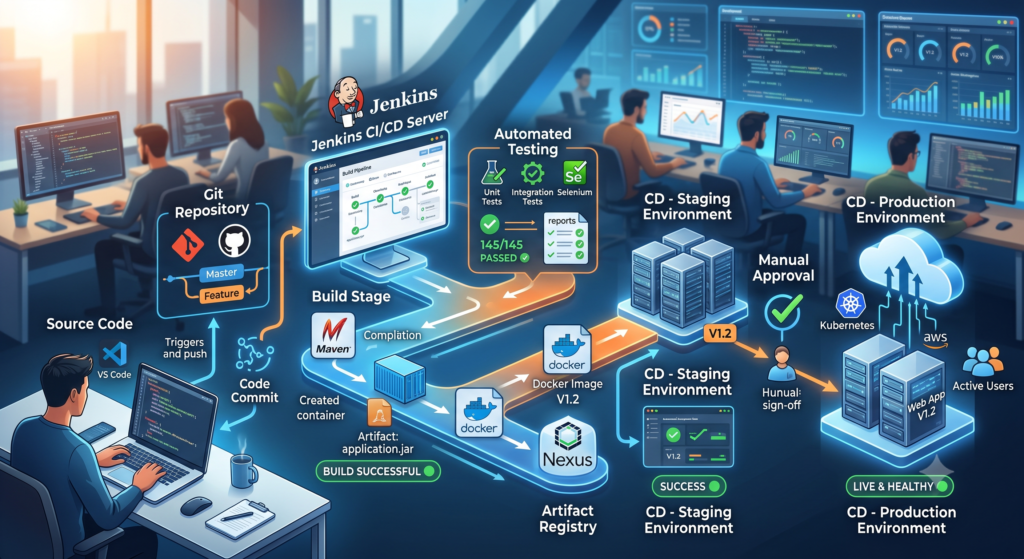
Suggested Image
Developer commits code to GitHub, Jenkins builds application, automated testing occurs, Docker image created, Kubernetes deployment executed.
Understanding Continuous Integration
Continuous Integration is the first phase of a CI/CD Pipeline.
Whenever a developer commits code to a repository:
- Code is pushed to Git.
- Build process starts automatically.
- Automated tests run.
- Code quality checks execute.
- Team receives feedback.
This process helps teams identify issues immediately.
Example
Imagine ten developers working on the same project.
Without Continuous Integration:
- Code conflicts increase.
- Bugs remain hidden.
- Releases become risky.
With Continuous Integration:
- Changes merge frequently.
- Problems are detected early.
- Development becomes predictable.
This is why Continuous Integration forms the foundation of every modern CI/CD Pipeline.
Continuous Integration Workflow
A typical CI workflow includes:
Step 1: Code Commit
Developers push code changes to GitHub, GitLab, or Bitbucket.
Step 2: Trigger Pipeline
A CI server automatically detects changes.
Step 3: Build Application
Source code is compiled and packaged.
Step 4: Execute Tests
Automated tests verify functionality.
Step 5: Generate Artifacts
Build artifacts are stored for deployment.
Step 6: Report Results
Developers receive immediate feedback.
This process may take only a few minutes compared to hours or days in traditional workflows.
Understanding Continuous Delivery
Continuous Delivery extends Continuous Integration.
After code successfully passes testing:
- Artifacts are prepared
- Environments are updated
- Deployment packages are created
- Releases are made ready
However, deployment still requires manual approval.
Think of Continuous Delivery as:
“Always ready to deploy.”
Benefits include:
Lower Deployment Risk
Applications are always in a deployable state.
Faster Releases
Teams can deploy whenever required.
Better Reliability
Consistent release processes improve stability.
Improved Customer Satisfaction
New features reach users quickly.
Understanding Continuous Deployment
Continuous Deployment takes automation even further.
Every successful code change automatically reaches production.
Workflow:
Code Commit → Build → Test → Deploy to Production
No manual approval is required.
Benefits include:
- Faster innovation
- Rapid feedback
- Reduced deployment delays
- Higher productivity
Large technology companies frequently use Continuous Deployment to release updates multiple times per day.
Difference Between Continuous Delivery and Continuous Deployment
Many beginners confuse these concepts.
Continuous Delivery
- Automated testing
- Automated packaging
- Manual production approval
Continuous Deployment
- Automated testing
- Automated packaging
- Automated production deployment
The key difference is human approval.
Continuous Delivery requires it.
Continuous Deployment does not.
Stages of a CI/CD Pipeline
Most CI/CD pipelines include several stages.
Source Stage
Developers commit code changes.
Tools:
- Git
- GitHub
- GitLab
- Bitbucket
Build Stage
Application source code is compiled.
Examples:
- Java applications
- Node.js applications
- Python applications
- .NET applications
Purpose:
Transform source code into deployable artifacts.
Test Stage
Automated tests validate application quality.
Common testing types:
Unit Testing
Tests individual functions.
Integration Testing
Verifies system interactions.
Performance Testing
Measures application performance.
Security Testing
Detects vulnerabilities.
Testing is one of the most important stages of a successful CI/CD Pipeline.
Package Stage
Application artifacts are packaged.
Examples:
- Docker Images
- JAR Files
- WAR Files
- ZIP Packages
Artifacts are stored in repositories for deployment.
Deployment Stage
Applications are deployed to:
- Development Environment
- Testing Environment
- Staging Environment
- Production Environment
Automation ensures consistency across environments.
Monitoring Stage
Once applications are deployed:
- Logs are collected
- Metrics are analyzed
- Alerts are generated
- Performance is monitored
Popular monitoring tools include:
- Prometheus
- Grafana
- ELK Stack
- Datadog
CI/CD Pipeline Architecture
A modern CI/CD Pipeline typically includes:
Version Control System
Stores application code.
Examples:
- GitHub
- GitLab
- Bitbucket
CI Server
Executes automation tasks.
Examples:
- Jenkins
- GitHub Actions
- GitLab CI/CD
Artifact Repository
Stores deployment packages.
Examples:
- Nexus
- Artifactory
- Docker Hub
Deployment Platform
Runs applications.
Examples:
- Kubernetes
- AWS
- Azure
- Google Cloud
Real-World CI/CD Example
Imagine a team developing an e-commerce application.
Step 1:
Developer updates checkout functionality.
Step 2:
Code is pushed to GitHub.
Step 3:
Jenkins automatically starts a build.
Step 4:
Automated tests execute.
Step 5:
Docker image is created.
Step 6:
Image is pushed to Docker Hub.
Step 7:
Kubernetes deploys the updated application.
Step 8:
Monitoring tools verify system health.
The entire process can complete within minutes.
Without a CI/CD Pipeline, this process could require several hours or even days.
Why Every DevOps Engineer Must Learn CI/CD
Most modern DevOps jobs require CI/CD skills.
Organizations expect engineers to understand:
- Jenkins
- GitHub Actions
- Git
- Docker
- Kubernetes
- Cloud Platforms
- Infrastructure Automation
CI/CD knowledge is no longer optional.
It has become one of the core skills required for DevOps, Cloud, and Site Reliability Engineering roles.
Click here to learn more
Docker Tutorial for Beginners
Kubernetes Tutorial
Popular CI/CD Tools
A CI/CD Pipeline is only as effective as the tools used to automate it. Over the years, numerous tools have emerged to simplify Continuous Integration and Continuous Deployment processes.
The most popular CI/CD tools include:
- Jenkins
- GitHub Actions
- GitLab CI/CD
- CircleCI
- Azure DevOps
- Bamboo
- TeamCity
- ArgoCD
Each tool serves a similar purpose but offers different capabilities and integrations.
Jenkins CI/CD Pipeline Explained
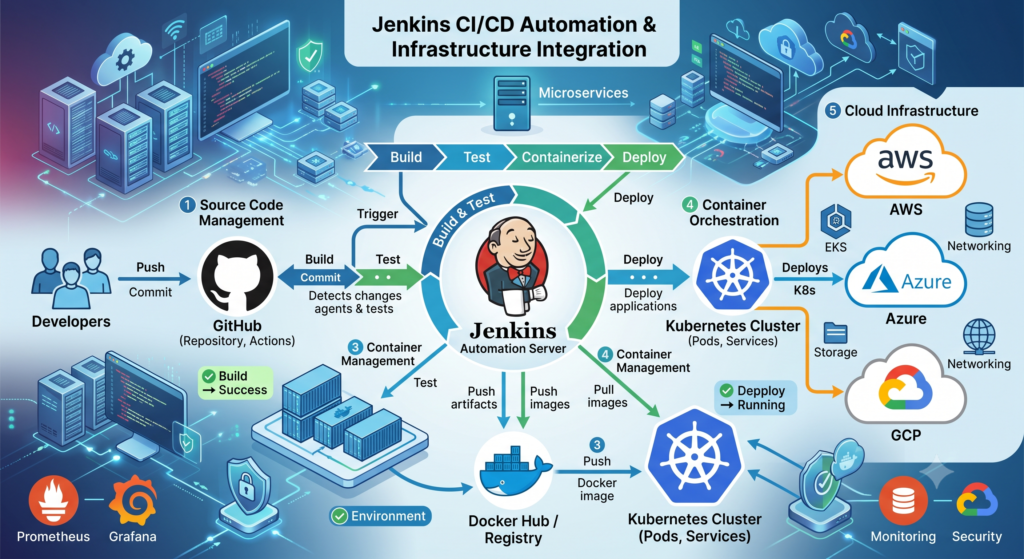
Jenkins is one of the most widely used automation servers in the DevOps ecosystem.
Thousands of organizations use Jenkins to automate software delivery processes.
Why Jenkins is Popular
Jenkins offers:
- Open-source platform
- Large plugin ecosystem
- Extensive community support
- Flexible integrations
- Strong automation capabilities
Jenkins can integrate with:
- GitHub
- GitLab
- Docker
- Kubernetes
- AWS
- Azure
- Terraform
This makes Jenkins a preferred choice for building a robust CI/CD Pipeline.
Jenkins Pipeline Workflow
A typical Jenkins pipeline looks like:
- Developer pushes code.
- Jenkins detects changes.
- Build process starts.
- Unit tests run.
- Docker image builds.
- Image is stored in Docker Registry.
- Deployment begins.
- Monitoring tools verify health.
Everything happens automatically.
Jenkins Pipeline Example
Stages commonly include:
Checkout
Pull source code from Git.
Build
Compile application.
Test
Run automated tests.
Package
Generate deployable artifact.
Deploy
Deploy application to servers.
Verify
Validate deployment success.
GitHub Actions CI/CD Pipeline Explained
GitHub Actions has become one of the fastest-growing CI/CD platforms.
Since many development teams already use GitHub, GitHub Actions offers seamless integration.
Benefits include:
- Native GitHub integration
- Easy configuration
- Cloud-hosted runners
- Large marketplace
- Cost-effective automation
How GitHub Actions Works
GitHub Actions uses workflow files written in YAML.
When events occur, workflows automatically execute.
Examples:
- Push events
- Pull requests
- Scheduled jobs
- Release creation
GitHub Actions Workflow Example
Developer pushes code →
GitHub Action triggers →
Application builds →
Tests execute →
Docker image created →
Application deployed.
The entire CI/CD Pipeline runs automatically.
Jenkins vs GitHub Actions
| Feature | Jenkins | GitHub Actions |
|---|---|---|
| Open Source | Yes | Partially |
| Setup Complexity | High | Low |
| Maintenance | Required | Minimal |
| GitHub Integration | Plugin Based | Native |
| Learning Curve | Moderate | Easy |
| Flexibility | Very High | High |
For beginners, GitHub Actions is often easier.
For large enterprises, Jenkins remains extremely popular.
GitLab CI/CD Pipeline Explained
GitLab offers built-in CI/CD functionality.
Unlike Jenkins, GitLab provides:
- Source Control
- CI/CD
- Security Scanning
- Container Registry
- Project Management
All within a single platform.
Benefits of GitLab CI/CD
Single Platform
Everything is managed in one location.
Integrated Security
Security scans can be automated.
Faster Development
Teams spend less time integrating multiple tools.
Cloud Native Support
Works effectively with Kubernetes environments.
CI/CD Pipeline with Docker
Docker has become a critical component of modern software delivery.
Containers ensure consistency across environments.
Benefits include:
- Portability
- Isolation
- Scalability
- Faster deployment
Traditional Deployment Problem
Without Docker:
Development Environment ≠ Testing Environment ≠ Production Environment
Result:
“It works on my machine.”
A sentence that has probably wasted more engineering hours than most software bugs.
Docker Solution
Docker packages:
- Application code
- Dependencies
- Runtime environment
- Configuration
Into a single container image.
This guarantees consistent behavior.
Docker CI/CD Workflow
Developer commits code →
Pipeline builds Docker image →
Image pushed to registry →
Deployment occurs automatically.
This workflow is common in modern CI/CD Pipeline implementations.
CI/CD Pipeline Explained with Kubernetes
As applications grow, managing containers manually becomes difficult.
Kubernetes solves this problem.
Kubernetes provides:
- Automated deployment
- Auto-scaling
- Self-healing
- Load balancing
Kubernetes Deployment Process
CI Pipeline:
- Build application
- Run tests
- Create Docker image
CD Pipeline:
- Deploy image to Kubernetes
- Update running containers
- Verify health checks
- Roll back if necessary
Why Kubernetes and CI/CD Work Together
Benefits include:
Faster Releases
Applications can be updated quickly.
Reduced Downtime
Rolling deployments minimize interruptions.
Scalability
Resources automatically scale.
Reliability
Failed containers are automatically replaced.
CI/CD in Cloud Platforms
Modern organizations deploy applications to cloud environments.
Popular platforms include:
- AWS
- Azure
- Google Cloud Platform
A cloud-based CI/CD Pipeline provides:
- Global scalability
- High availability
- Reduced infrastructure management
CI/CD on AWS
Common AWS services include:
- CodePipeline
- CodeBuild
- CodeDeploy
- ECR
- EKS
AWS enables fully automated deployment workflows.
CI/CD on Azure
Azure DevOps provides:
- Repositories
- Pipelines
- Boards
- Artifacts
Azure integrates seamlessly with Microsoft ecosystems.
CI/CD on Google Cloud
Google Cloud provides:
- Cloud Build
- Artifact Registry
- Cloud Deploy
- GKE
These services help automate cloud-native deployments.
Benefits of CI/CD Pipeline
Organizations adopt CI/CD because of significant advantages.
Faster Software Delivery
Features reach customers quickly.
Higher Software Quality
Automated testing identifies issues earlier.
Reduced Deployment Failures
Standardized processes improve reliability.
Increased Productivity
Developers spend less time on manual tasks.
Improved Customer Experience
Customers receive updates and fixes faster.
Better Collaboration
Development and operations teams work together effectively.
Common CI/CD Challenges
Despite its advantages, implementing a CI/CD Pipeline is not always easy.
Complex Tool Integration
Multiple tools must work together.
Examples:
- Git
- Jenkins
- Docker
- Kubernetes
- Cloud Platforms
Flaky Tests
Unstable tests can reduce confidence in automation.
Solution:
Maintain reliable test suites.
Security Risks
Automated deployments require secure credentials management.
Solution:
Use:
- Vault
- Secrets Manager
- Key Vault
Infrastructure Complexity
Large-scale deployments require careful planning.
Solution:
Infrastructure as Code.
Cultural Resistance
Some teams resist automation.
Solution:
Education and gradual adoption.
CI/CD Best Practices
Successful organizations follow proven best practices.
Automate Everything Possible
Automation reduces errors and improves consistency.
Keep Pipelines Fast
Long pipelines slow development.
Optimize builds and tests regularly.
Test Early
Shift testing left.
Detect issues before deployment.
Use Infrastructure as Code
Manage environments using code.
Popular tools:
- Terraform
- CloudFormation
- Bicep
Monitor Continuously
Monitor:
- Applications
- Infrastructure
- Logs
- User experience
Implement Security Early
Integrate security into the pipeline.
This approach is known as DevSecOps.
DevSecOps and the Future of CI/CD
As organizations automate software delivery, security must become an integral part of the development process.
Traditionally, security checks were performed at the end of development. This often caused delays, increased costs, and introduced vulnerabilities into production environments.
Modern organizations are solving this challenge through DevSecOps.
DevSecOps stands for:
Development + Security + Operations
The goal is simple:
Integrate security into every stage of the CI/CD Pipeline.
What is DevSecOps?
DevSecOps extends traditional DevOps by embedding security practices throughout the software development lifecycle.
Instead of waiting until deployment, security becomes everyone’s responsibility.
A DevSecOps pipeline includes:
- Secure coding practices
- Automated vulnerability scanning
- Dependency analysis
- Container security
- Compliance validation
- Infrastructure security checks
This approach helps organizations identify security issues much earlier.
DevSecOps in a CI/CD Pipeline Explained
A modern DevSecOps workflow looks like:
Developer Commit →
Source Code Analysis →
Build Process →
Security Scanning →
Automated Testing →
Container Scanning →
Deployment →
Continuous Monitoring
Security is no longer a separate phase.
It becomes part of the entire CI/CD Pipeline.
Popular DevSecOps Tools
SonarQube
Performs static code analysis.
Benefits:
- Code quality checks
- Security vulnerability detection
- Technical debt identification
Trivy
Container vulnerability scanning tool.
Commonly used with:
- Docker
- Kubernetes
- CI/CD platforms
Snyk
Identifies vulnerabilities in:
- Open-source libraries
- Containers
- Infrastructure code
OWASP ZAP
Automated security testing tool.
Useful for:
- Web applications
- API security testing
HashiCorp Vault
Securely manages:
- Secrets
- Credentials
- Tokens
- Certificates
CI/CD Pipeline Interview Questions
Many DevOps interviews include CI/CD-related questions.
Understanding these concepts can significantly improve job prospects.
What is CI/CD?
CI/CD stands for Continuous Integration and Continuous Deployment.
It automates software delivery from code commit to production deployment.
What is the difference between CI and CD?
Continuous Integration
Focuses on automated building and testing.
Continuous Deployment
Focuses on automated production releases.
What are the stages of a CI/CD Pipeline?
Typical stages include:
- Source
- Build
- Test
- Package
- Deploy
- Monitor
Why is CI/CD important?
Benefits include:
- Faster releases
- Improved quality
- Reduced failures
- Better collaboration
What tools are used in CI/CD?
Popular tools include:
- Jenkins
- GitHub Actions
- GitLab CI/CD
- CircleCI
- Azure DevOps
How does Docker fit into CI/CD?
Docker packages applications into portable containers.
These containers move consistently across environments.
How does Kubernetes support CI/CD?
Kubernetes automates:
- Deployments
- Scaling
- Recovery
- Rollbacks
This makes Kubernetes a natural companion for modern CI/CD workflows.
CI/CD Career Opportunities
The demand for CI/CD expertise continues to grow.
Organizations need professionals capable of building and managing automated delivery pipelines.
DevOps Engineer
Responsible for:
- Automation
- Infrastructure management
- CI/CD implementation
- Cloud operations
Cloud Engineer
Works with:
- AWS
- Azure
- Google Cloud
Often manages deployment automation.
Site Reliability Engineer (SRE)
Focuses on:
- Reliability
- Performance
- Availability
CI/CD skills are essential.
Platform Engineer
Builds internal developer platforms and automation systems.
Cloud Architect
Designs scalable cloud solutions and deployment strategies.
Skills Required for CI/CD Engineers
To master a CI/CD Pipeline, professionals should learn:
Linux
Most DevOps environments run on Linux.
Git
Version control is foundational.
Docker
Containerization is essential.
Kubernetes
Container orchestration has become an industry standard.
Cloud Platforms
Learn at least one:
- AWS
- Azure
- Google Cloud
Terraform
Infrastructure as Code automation.
Jenkins or GitHub Actions
Pipeline automation tools.
Monitoring
Popular tools include:
- Prometheus
- Grafana
- ELK Stack
Learning Path for Beginners
If you’re new to DevOps, follow this roadmap:
Step 1
Learn Linux fundamentals.
Step 2
Master Git and GitHub.
Step 3
Learn scripting.
Examples:
- Bash
- Python
Step 4
Understand DevOps principles.
Step 5
Learn Docker.
Step 6
Study CI/CD concepts.
Step 7
Master Jenkins or GitHub Actions.
Step 8
Learn Kubernetes.
Step 9
Explore Cloud Platforms.
Step 10
Build real-world projects.
This roadmap helps develop practical experience with CI/CD Pipeline implementation.
Real-World CI/CD Project Example
Let’s consider a modern e-commerce application.
Technology Stack:
- React Frontend
- Node.js Backend
- MongoDB Database
- Docker
- Kubernetes
- AWS
Pipeline Workflow:
- Developer commits code.
- GitHub Actions starts build.
- Unit tests execute.
- Docker image created.
- Image pushed to Docker Hub.
- Kubernetes deployment updated.
- Monitoring tools validate health.
- Alerts generated if issues occur.
This automated process can complete in minutes.
Without a CI/CD Pipeline, the same release might require hours of manual effort.
Conclusion
Modern software development depends heavily on automation, speed, and reliability. Organizations can no longer afford slow release cycles, manual deployments, or inconsistent delivery processes.
A CI/CD Pipeline solves these challenges by automating code integration, testing, packaging, deployment, and monitoring.
Throughout this CI/CD Pipeline Explained guide, we explored:
- Continuous Integration
- Continuous Delivery
- Continuous Deployment
- Jenkins
- GitHub Actions
- GitLab CI/CD
- Docker
- Kubernetes
- DevSecOps
- Cloud CI/CD
- Career Opportunities
- Best Practices
As organizations continue embracing DevOps and cloud-native technologies, mastering a CI/CD Pipeline becomes an essential skill for developers, cloud engineers, DevOps engineers, and IT professionals.
Whether you are starting your DevOps journey or looking to advance your career, learning CI/CD can open the door to some of the most in-demand technology roles in the industry.
Frequently Asked Questions (FAQ)
What does CI/CD stand for?
CI/CD stands for Continuous Integration and Continuous Deployment.
Why is CI/CD important in DevOps?
CI/CD automates software delivery, improves quality, reduces deployment failures, and accelerates releases.
Is Jenkins still relevant in 2026?
Yes,Jenkins remains one of the most widely used CI/CD tools globally.
Which is better: Jenkins or GitHub Actions?
GitHub Actions is easier for beginners. Jenkins provides greater flexibility for enterprise environments.
Can CI/CD be used without Docker?
Yes,However, Docker significantly improves consistency across environments.
Is Kubernetes required for CI/CD?
No.
But Kubernetes is commonly used in modern cloud-native deployments.
What language should I learn for DevOps?
Python is highly recommended.
Bash scripting is also valuable.
Is CI/CD difficult to learn?
The concepts are straightforward.
Mastering the tools requires hands-on practice and real-world projects.
Is CI/CD a good career skill?
Absolutely.
CI/CD expertise is one of the most sought-after skills in DevOps, Cloud Engineering, and Site Reliability Engineering roles.

Pingback: Docker Compose Tutorial for Beginners | Complete Docker Compose Guide 2026