
Kubernetes Tutorial: Introduction
If you are starting your journey into DevOps, cloud computing, and container orchestration, this Kubernetes Tutorial will help you understand one of the most important technologies used by modern organizations.
Today, companies deploy applications across multiple servers, cloud environments, and regions. Managing hundreds or thousands of containers manually is almost impossible. This is where Kubernetes comes into the picture.
This Kubernetes Tutorial explains how Kubernetes works, why it has become the industry standard for container orchestration, and how beginners can start learning Kubernetes step by step.
Whether you are a student, developer, system administrator, cloud engineer, or DevOps professional, this Kubernetes Tutorial will provide a strong foundation for understanding Kubernetes and its real-world applications.
Table of Contents
What is Kubernetes?
A Kubernetes Tutorial should begin with understanding what Kubernetes actually is.
Kubernetes is an open-source container orchestration platform designed to automate:
- Container deployment
- Container scaling
- Container networking
- Container management
- Container recovery
Kubernetes was originally developed by Google and later donated to the Cloud Native Computing Foundation (CNCF).
The primary purpose of Kubernetes is to manage containerized applications efficiently.
Without Kubernetes, organizations would need to manually manage containers, deployments, updates, and failures.
A modern Kubernetes Tutorial always starts by explaining that Kubernetes solves operational challenges associated with large-scale container environments.
Why Kubernetes is Important
The popularity of Kubernetes continues to grow every year.
Reasons include:
Automated Scaling
Applications automatically scale based on workload.
Self-Healing
Failed containers restart automatically.
High Availability
Applications remain available even when servers fail.
Efficient Resource Utilization
Resources are allocated intelligently.
Cloud Portability
Applications can run across different cloud providers.
Because of these advantages, learning through a quality Kubernetes Tutorial has become essential for DevOps professionals.
History of Kubernetes
Before Kubernetes, organizations relied heavily on virtual machines.
Virtual machines introduced several challenges:
- High resource consumption
- Slow startup times
- Complex management
Containers improved efficiency.
However, managing thousands of containers created new problems.
Google solved these issues internally through a system called Borg.
Kubernetes was inspired by Borg and released as an open-source project.
Every comprehensive Kubernetes Tutorial discusses this evolution because understanding the history helps explain Kubernetes’ design principles.
Kubernetes Tutorial: Understanding Container Orchestration
Container orchestration refers to managing containers automatically.
Tasks include:
- Deployment
- Scheduling
- Networking
- Recovery
- Scaling
Without orchestration:
- Teams manage containers manually.
- Scaling becomes difficult.
- Updates become risky.
- Failures require human intervention.
With Kubernetes:
- Deployments become automated.
- Recovery becomes automatic.
- Scaling becomes simple.
This is one reason every modern Kubernetes Tutorial focuses heavily on orchestration concepts.
Kubernetes Architecture
Understanding architecture is a critical part of any Kubernetes Tutorial.
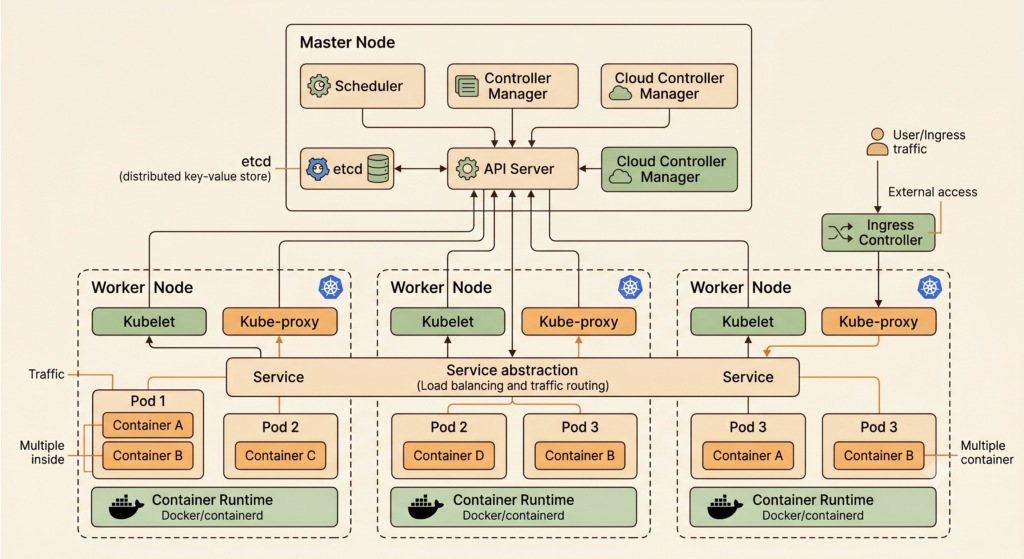
A Kubernetes cluster consists of:
Control Plane
The Control Plane manages cluster operations.
Responsibilities include:
- Scheduling
- Cluster state management
- Resource allocation
- API management
Worker Nodes
Worker nodes run application workloads.
Components include:
- Kubelet
- Kube Proxy
- Container Runtime
[IMAGE PLACEHOLDER 2]
ALT TEXT: Kubernetes Tutorial architecture diagram
Components of Kubernetes
API Server
Acts as the central communication point.
Scheduler
Determines where Pods should run.
Controller Manager
Maintains desired state.
ETCD
Stores cluster information and configuration.
These components form the foundation of Kubernetes and are explained in detail throughout this Kubernetes Tutorial.
What are Pods?
Pods are the smallest deployable units in Kubernetes.
A Pod may contain:
- One container
- Multiple containers
Pods share:
- Networking
- Storage
- Configuration
A Kubernetes Tutorial cannot be complete without understanding Pods because almost every Kubernetes object interacts with Pods.
What are Nodes?
Nodes are machines that run workloads.
Nodes can be:
- Physical Servers
- Virtual Machines
- Cloud Instances
Worker nodes execute Pods while the Control Plane manages cluster operations.
Kubernetes Deployments
Deployments allow organizations to manage applications efficiently.
Benefits include:
- Automated updates
- Rollbacks
- Scaling
- Reliability
A deployment defines how applications should run inside a cluster.
Most production environments rely heavily on Deployments.
Because of this, Deployments remain one of the most important concepts covered in any Kubernetes Tutorial.
ReplicaSets
ReplicaSets ensure the desired number of Pods remain running.
Example:
Desired Pods = 5
Current Pods = 4
Kubernetes automatically creates a replacement Pod.
This self-healing capability is one of the reasons Kubernetes has become so popular.
Kubernetes Services
Pods are temporary.
Their IP addresses can change.
Services provide stable communication.
Types include:
- ClusterIP
- NodePort
- LoadBalancer
- ExternalName
Understanding Services is a fundamental part of this Kubernetes Tutorial because applications must communicate reliably within clusters.
Kubernetes Networking
Networking is one of the most important topics covered in any Kubernetes Tutorial because applications running inside a cluster must communicate efficiently.
Kubernetes provides a flexible networking model that enables communication between:
- Pods
- Services
- Nodes
- External Users
The Kubernetes networking model ensures:
- Every Pod receives its own IP address
- Pods communicate without Network Address Translation (NAT)
- Services provide stable endpoints
Pod-to-Pod Communication
Pods can communicate directly using their assigned IP addresses.
Benefits include:
- Simplified networking
- Better scalability
- Improved application communication
Understanding Pod networking is a critical step in this Kubernetes Tutorial because most applications depend on communication between services.
Service Networking
Since Pod IPs are temporary, Kubernetes Services provide stable communication endpoints.
Example:
Frontend Application → Backend API → Database
Services ensure communication continues even when Pods restart.
Ingress
Ingress provides external access to applications running in Kubernetes.
Benefits include:
- URL routing
- SSL termination
- Load balancing
- Traffic management
Most production environments use Ingress controllers to expose applications securely.
A professional Kubernetes Tutorial always includes Ingress because it is widely used in real-world deployments.
Kubernetes Storage
Containers are generally temporary.
When a container stops, data stored inside it may disappear.
This creates challenges for:
- Databases
- File uploads
- Application logs
Kubernetes solves this through persistent storage.
Persistent Volumes (PV)
Persistent Volumes provide long-term storage.
Benefits include:
- Data persistence
- Shared storage
- Independent lifecycle
Applications continue to access data even after Pods restart.
Persistent Volume Claims (PVC)
PVCs allow applications to request storage resources.
Developers specify:
- Storage size
- Access mode
- Storage requirements
Kubernetes automatically provisions the required storage.
Storage management is another critical concept covered throughout this Kubernetes Tutorial.
ConfigMaps and Secrets
Applications often require configuration data.
Examples include:
- Database URLs
- API endpoints
- Environment variables
Kubernetes provides ConfigMaps for non-sensitive data.
ConfigMaps
Store:
- Application settings
- Environment variables
- Configuration files
Benefits:
- Centralized configuration
- Easier updates
- Better portability
Secrets
Secrets store sensitive information such as:
- Passwords
- Tokens
- Certificates
- API Keys
Using Secrets improves security and follows best practices recommended in every enterprise-level Kubernetes Tutorial.
Kubernetes Scaling
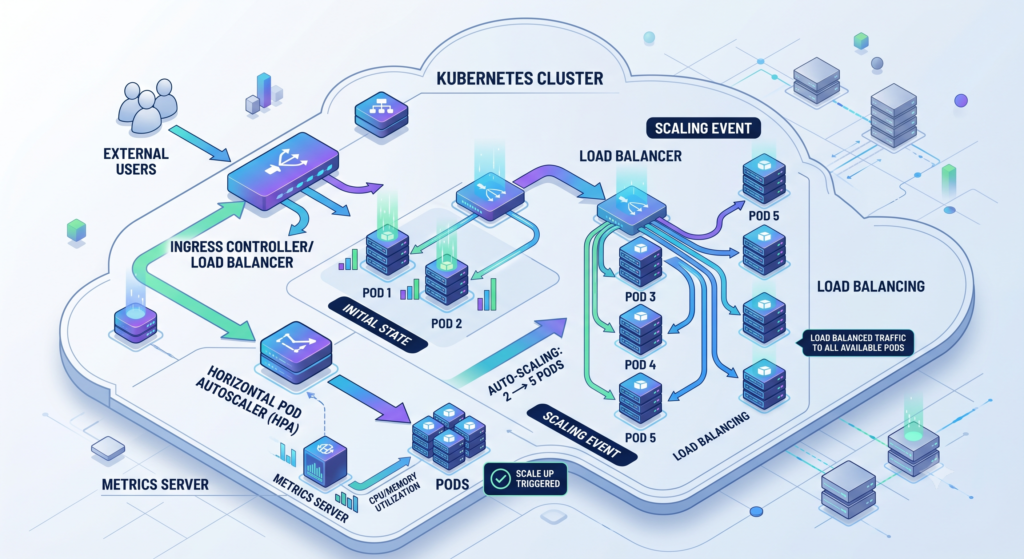
One major advantage of Kubernetes is scalability.
Applications can automatically scale based on demand.
Benefits include:
- Better performance
- Improved reliability
- Cost optimization
Manual Scaling
Administrators specify the number of replicas.
Example:
kubectl scale deployment nginx --replicas=5
Kubernetes automatically creates additional Pods.
Horizontal Pod Autoscaler (HPA)
HPA automatically adjusts Pods based on:
- CPU usage
- Memory consumption
- Custom metrics
This automation makes Kubernetes extremely powerful for modern applications.
Any advanced Kubernetes Tutorial should include autoscaling concepts because they are heavily used in production.
Load Balancing in Kubernetes
Traffic must be distributed evenly across application instances.
Kubernetes provides built-in load balancing.
Benefits:
- Improved availability
- Better performance
- Reduced bottlenecks
Load balancing ensures users experience reliable application performance.
Essential Kubernetes Commands
Learning kubectl commands is a major milestone in every Kubernetes Tutorial.
Check Cluster Information
kubectl cluster-info
View Nodes
kubectl get nodes
View Pods
kubectl get pods
View Deployments
kubectl get deployments
Create Deployment
kubectl create deployment nginx --image=nginx
Scale Deployment
kubectl scale deployment nginx --replicas=5
Delete Pod
kubectl delete pod pod-name
View Logs
kubectl logs pod-name
Describe Pod
kubectl describe pod pod-name
These commands form the foundation of daily Kubernetes administration.
Kubernetes Tutorial with Docker
Docker and Kubernetes work together closely.
Docker creates containers.
Kubernetes manages containers.
Workflow:
- Developer creates application.
- Docker builds image.
- Image pushed to registry.
- Kubernetes deploys image.
- Kubernetes scales application.
This relationship is fundamental to understanding modern cloud-native architecture.
A practical Kubernetes Tutorial always demonstrates Docker integration because most Kubernetes workloads run containerized applications.
Kubernetes Tutorial with CI/CD Pipelines
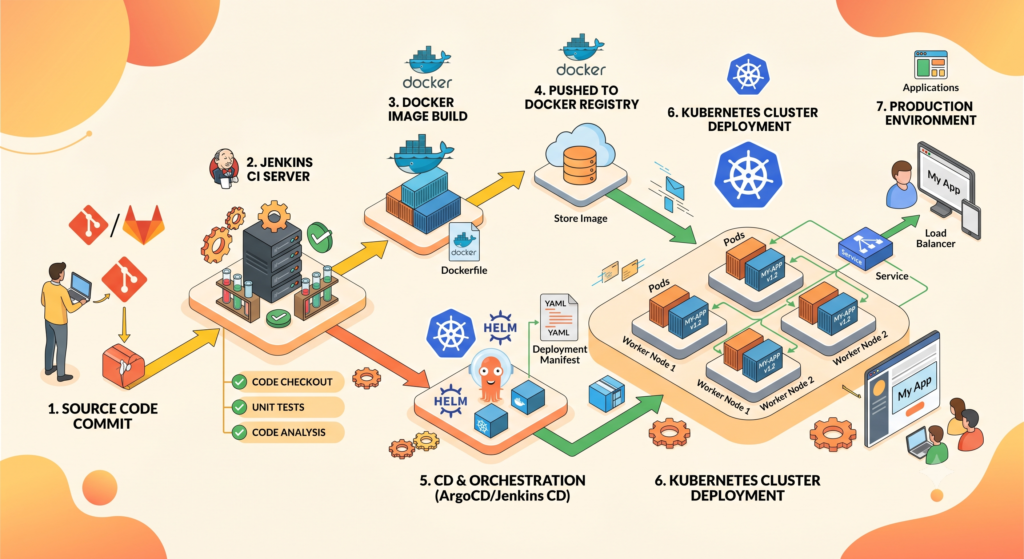
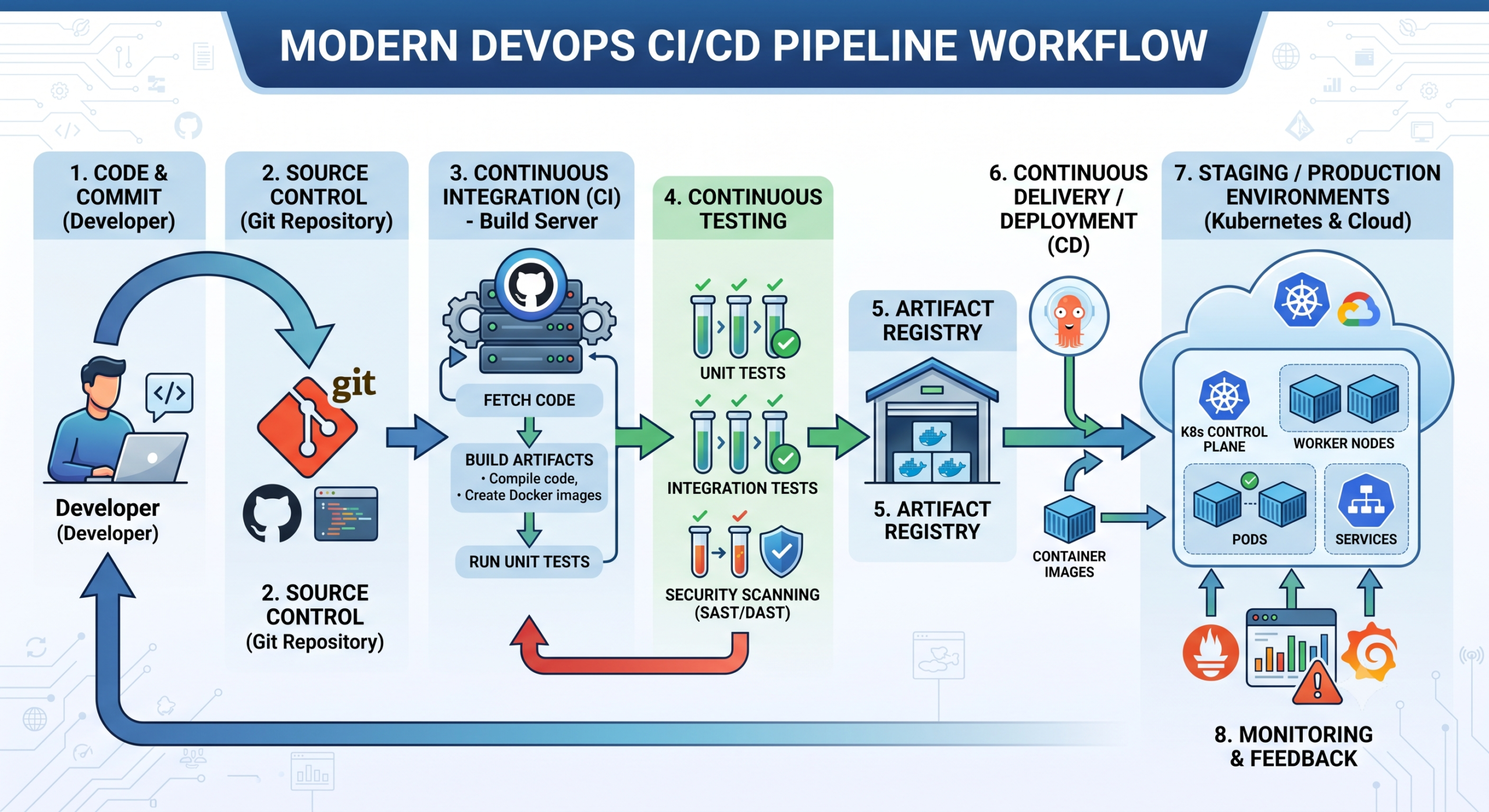
Modern DevOps teams combine Kubernetes with CI/CD automation.
Typical workflow:
Developer Commit →
GitHub →
Jenkins →
Docker Build →
Container Registry →
Kubernetes Deployment →
Monitoring
Benefits include:
- Faster releases
- Automated deployments
- Reduced downtime
- Improved consistency
Integrating Kubernetes into a CI/CD pipeline is one of the most valuable skills learned from a real-world Kubernetes Tutorial.
Kubernetes on AWS
AWS offers:
Amazon EKS
Elastic Kubernetes Service simplifies cluster management.
Benefits:
- Managed Control Plane
- High Availability
- Security Integration
- AWS Service Integration
Many organizations run production workloads using Amazon EKS.
Kubernetes on Azure
Azure provides:
Azure Kubernetes Service (AKS)
Benefits include:
- Easy deployment
- Automated upgrades
- Integrated monitoring
- Cost optimization
AKS is one of the most popular managed Kubernetes services.
Kubernetes on Google Cloud
Google Cloud offers:
Google Kubernetes Engine (GKE)
Since Google created Kubernetes, GKE provides excellent support.
Benefits:
- Fast cluster provisioning
- Advanced networking
- Enterprise-grade reliability
Cloud-based Kubernetes services reduce operational overhead significantly.
Kubernetes Best Practices
Learning Kubernetes is important, but running Kubernetes efficiently is even more important. Every production-ready Kubernetes Tutorial should include best practices because poorly configured clusters can lead to downtime, security issues, and unnecessary costs.
Use Namespaces
Namespaces help organize Kubernetes resources.
Benefits include:
- Environment separation
- Better resource management
- Improved security
- Easier administration
Example:
- Development Namespace
- Testing Namespace
- Production Namespace
Namespaces are heavily used in enterprise Kubernetes environments.
Define Resource Limits
Without resource limits, a single application can consume excessive CPU and memory.
Always define:
- CPU Requests
- CPU Limits
- Memory Requests
- Memory Limits
Benefits:
- Better cluster stability
- Improved resource utilization
- Reduced performance issues
A professional Kubernetes Tutorial always emphasizes resource management because it directly affects production reliability.
Use Health Checks
Kubernetes provides:
Liveness Probes
Determine whether containers should be restarted.
Readiness Probes
Determine whether traffic should be sent to containers.
Benefits:
- Faster recovery
- Improved uptime
- Better application stability
Use RBAC
Role-Based Access Control (RBAC) improves cluster security.
RBAC controls:
- User permissions
- Service account permissions
- Administrative access
Security should never be ignored when implementing Kubernetes.
Use Secrets Properly
Avoid storing sensitive information directly inside deployment files.
Store:
- Passwords
- API Keys
- Tokens
- Certificates
Using Kubernetes Secrets is a best practice recommended in every enterprise Kubernetes Tutorial.
Common Kubernetes Mistakes
Many beginners make similar mistakes while learning Kubernetes.
Avoiding these mistakes can accelerate your learning journey.
Ignoring Monitoring
Without monitoring:
- Issues remain undetected
- Performance degrades
- Troubleshooting becomes difficult
Popular monitoring tools:
- Prometheus
- Grafana
- ELK Stack
Running Everything in Default Namespace
This becomes difficult to manage at scale.
Always use namespaces.
Missing Resource Limits
Applications can consume excessive resources.
This often causes:
- Cluster instability
- Performance degradation
- Unexpected failures
Lack of Backup Strategy
ETCD stores critical cluster information.
Always maintain backups.
Poor Security Practices
Never expose unnecessary services publicly.
Use:
- RBAC
- Network Policies
- Secrets
- Security Scanning
These recommendations are frequently highlighted in advanced Kubernetes Tutorial resources.
Kubernetes Interview Questions
If you are preparing for DevOps interviews, these questions are frequently asked.
What is Kubernetes?
Kubernetes is an open-source container orchestration platform used for automating deployment, scaling, and management of containerized applications.
What is a Pod?
A Pod is the smallest deployable unit in Kubernetes.
It can contain:
- One container
- Multiple containers
What is a Deployment?
A Deployment manages application updates and ensures desired application state.
What is a ReplicaSet?
A ReplicaSet ensures the required number of Pods remain running.
What is a Service?
A Service provides stable networking access to Pods.
What is ETCD?
ETCD is a distributed key-value store used to maintain Kubernetes cluster state.
What is a Namespace?
A Namespace logically separates Kubernetes resources.
What is an Ingress?
Ingress manages external access to applications running inside Kubernetes clusters.
Difference Between Docker and Kubernetes?
Docker creates containers.
Kubernetes manages and orchestrates containers.
Understanding this distinction is fundamental in every Kubernetes Tutorial.
Kubernetes Certifications
Certifications can help validate Kubernetes skills.
Popular certifications include:
CKA
Certified Kubernetes Administrator
Focus Areas:
- Cluster Administration
- Networking
- Security
- Troubleshooting
CKAD
Certified Kubernetes Application Developer
Focus Areas:
- Application Development
- Deployments
- Services
- Configuration
CKS
Certified Kubernetes Security Specialist
Focus Areas:
- Security
- Compliance
- Threat Detection
Career Opportunities After Learning Kubernetes
The demand for Kubernetes professionals continues to grow worldwide.
Organizations increasingly adopt cloud-native technologies and containerized applications.
Learning through a complete Kubernetes Tutorial can open several career paths.
DevOps Engineer
Responsibilities:
- Automation
- CI/CD Pipelines
- Infrastructure Management
Cloud Engineer
Works with:
- AWS
- Azure
- Google Cloud
Often manages Kubernetes clusters.
Site Reliability Engineer (SRE)
Focuses on:
- Reliability
- Monitoring
- Performance
- Automation
Platform Engineer
Builds internal developer platforms using Kubernetes and cloud-native technologies.
Cloud Architect
Designs scalable infrastructure solutions using Kubernetes and cloud services.
Kubernetes Salary in India
Kubernetes skills are among the highest-paying DevOps skills today.
Approximate salary ranges:
Beginner (0-2 Years)
₹4 LPA – ₹8 LPA
Mid-Level (3-6 Years)
₹8 LPA – ₹18 LPA
Senior Level (7+ Years)
₹18 LPA – ₹40+ LPA
Professionals who combine Kubernetes with:
- AWS
- Azure
- Terraform
- CI/CD
- DevOps
often command even higher salaries.
Learning Roadmap After This Kubernetes Tutorial
Once you complete this Kubernetes Tutorial, focus on learning:
Docker
Containerization fundamentals.
Jenkins
CI/CD automation.
GitHub Actions
Modern CI/CD workflows.
Terraform
Infrastructure as Code.
AWS
Cloud infrastructure management.
Azure
Enterprise cloud services.
Monitoring Tools
Prometheus and Grafana.
Linux
System administration fundamentals.
These technologies complement Kubernetes and are commonly used together.
Frequently Asked Questions (FAQ)
Is Kubernetes difficult to learn?
Initially, Kubernetes can seem complex because it introduces many new concepts.
However, following a structured Kubernetes Tutorial and practicing regularly makes learning much easier.
Do I need Docker before Kubernetes?
Yes.
Understanding Docker containers helps build a strong Kubernetes foundation.
Is Kubernetes still worth learning in 2026?
Absolutely.
Kubernetes remains the leading container orchestration platform globally.
Can Kubernetes run without cloud providers?
Yes.
Kubernetes can run:
On-premises
Virtual Machines
Physical Servers
Cloud Platforms
What programming language is required for Kubernetes?
You do not need to be an expert programmer.
Basic knowledge of:
YAML
Linux
Bash
Python
is usually sufficient.
Is Kubernetes used by large companies?
Many organizations use Kubernetes for production workloads, including technology companies, financial institutions, healthcare providers, and e-commerce platforms.
Which certification should beginners start with?
Most beginners start with:
Certified Kubernetes Administrator (CKA)
because it provides a strong understanding of cluster administration.
Can Kubernetes help my DevOps career?
Yes.
Kubernetes has become one of the most in-demand skills for DevOps Engineers, Cloud Engineers, Platform Engineers, and Site Reliability Engineers.
Can we learn kubernetes in one day?
Logically it is not possible to master a devop tool within a day you can get overview by reading docs and watching tutorials
Conclusion
This Kubernetes Tutorial covered everything beginners need to understand Kubernetes and container orchestration. We explored Kubernetes architecture, Pods, Nodes, Deployments, Services, Networking, Storage, Scaling, Security, CI/CD integration, cloud platforms, certifications, and career opportunities.
Modern organizations require scalable, reliable, and automated infrastructure solutions. Kubernetes provides exactly that. It enables businesses to deploy applications faster, recover from failures automatically, scale workloads efficiently, and manage complex environments with confidence.
For anyone pursuing a career in DevOps, Cloud Computing, Site Reliability Engineering, or Platform Engineering, mastering Kubernetes is no longer optional. Kubernetes has become a core technology in modern infrastructure management.
By completing this Kubernetes Tutorial and practicing with real-world projects, you will build skills that remain highly valuable across the technology industry.
Read Our More Articles below
- DevOps Roadmap 2026
- What is DevOps?
- Docker Tutorial
- CI/CD Pipeline Explained
- Jenkins Tutorial
- Terraform Tutorial
- AWS Beginner Guide
- Azure for Beginners
- GitHub Actions Tutorial
Follow some official documentation
- Kubernetes Official Documentation
- CNCF Documentation
- Helm Documentation
- Docker Documentation
- Kubernetes Learning Environment

Pingback: Docker Compose Tutorial for Beginners | Complete Docker Compose Guide 2026