

Docker Compose Tutorial
Managing multiple Docker containers manually becomes frustrating surprisingly fast. One container runs your backend, another runs your database, another handles caching, and perhaps another serves your frontend. Starting each one separately is tedious and prone to mistakes.
This is exactly where the Docker Compose Tutorial becomes valuable.
This Docker Compose Tutorial helps beginners understand multi-container applications. Docker Compose lets you define an entire multi-container application inside a single YAML file. Instead of running ten Docker commands, you execute one command and your whole application comes to life.
Whether you are a beginner learning Docker or an experienced DevOps engineer building production-ready systems, understanding Docker Compose is an essential skill.
In this Docker Compose Tutorial, we’ll learn networking., you’ll learn installation, configuration, services, networking, volumes, environment variables, production best practices, troubleshooting, and advanced tips.
What is Docker Compose? | Docker Compose Tutorial
Our Docker Compose Tutorial includes practical examples. Docker Compose is an official Docker tool that allows developers to define and manage multiple containers using a single YAML configuration file.
Instead of typing numerous Docker commands, you simply create a docker-compose.yml file describing every service your application needs.
For example, a MERN application usually requires:
• React Frontend
• Node.js Backend
• MongoDB Database
• Redis Cache
• Nginx Reverse Proxy
Docker Compose starts all of them simultaneously using one command.
docker compose up
That’s the beauty of Docker Compose.
Table of Contents
Why Use Docker Compose?
Follow this Docker Compose Tutorial to build production-ready applications. Docker Compose simplifies development tremendously.
Major advantages include:
• One command starts everything
• Infrastructure as Code
• Easy collaboration
• Version-controlled configuration
• Automatic networking
• Volume management
• Environment variable support
• Fast local development
• Reproducible environments
Without Docker Compose, every developer on your team may configure services differently. Compose eliminates these inconsistencies.
Docker Compose Tutorial : Docker Compose Architecture
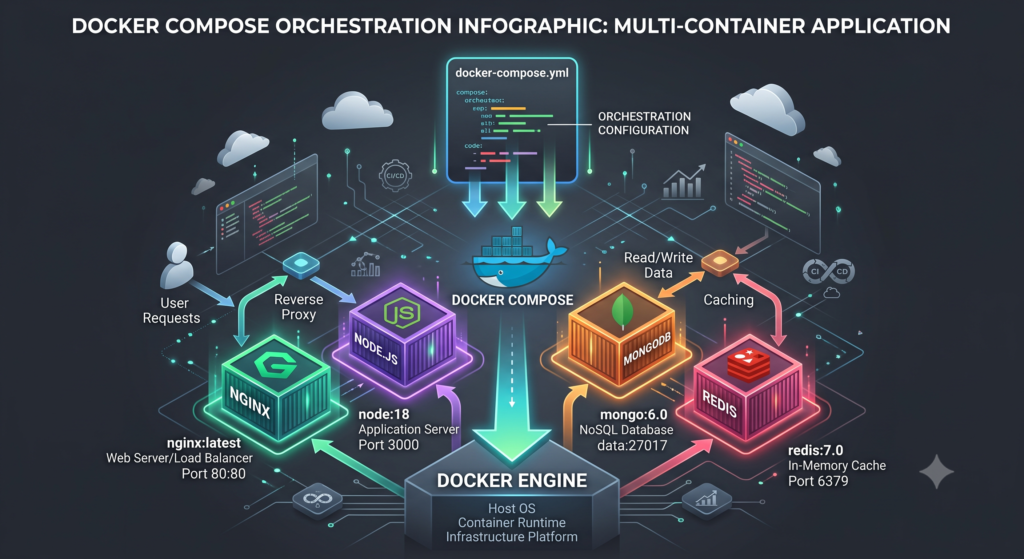
A Docker Compose project generally contains:
Project Folder
├── docker-compose.yml
├── backend/
├── frontend/
├── nginx/
├── .env
└── README.md
Docker Compose reads docker-compose.yml and performs these tasks:
• Creates containers
• Creates virtual networks
• Attaches storage volumes
• Configures ports
• Sets environment variables
• Maintains container relationships
This architecture ensures consistency between development and deployment.
Installing Docker Compose
Follow Docker Compose Tutorial
Modern Docker Desktop already includes Docker Compose.
Verify installation.
docker compose version
Example output
Docker Compose version v2.40.x
Linux installation
sudo apt update
sudo apt install docker-compose-plugin
Verify
docker compose version
If the version appears successfully, Docker Compose is installed correctly.
Create Your First Docker Compose Project
Follow below commands with Docker Compose Tutorial
Create a folder
mkdir docker-demo
cd docker-demo
Create docker-compose.yml
version: “3.9”
services:
web:
image: nginx

ports:

  - "8080:80"
Run
docker compose up
Open browser
You’ll see the default Nginx page.
Congratulations.
You have deployed your first application using Docker Compose.
Understanding docker-compose.yml
The docker-compose.yml file is the heart of Docker Compose.
Example
version: “3.9”
services:
app:
image: nginxEvery configuration starts here.
A Compose file generally includes
• Version
• Services
• Volumes
• Networks
• Environment Variables
• Build Instructions
• Restart Policies
Learning this file is the foundation of mastering Docker Compose.
Services in Docker Compose
A service represents one running container.
Example
services:
mongodb:
image: mongobackend:
build: .frontend:
image: nginxEach service performs one responsibility.
Following the microservices philosophy makes applications easier to maintain and scale.
Building Images Automatically
Instead of downloading an image, Docker Compose can build one.
Example
backend:
build:
context: .

dockerfile: Dockerfile
This tells Docker Compose to create the image locally before launching the container.
This approach is ideal during development because every code change can produce a fresh image.
Exposing Ports
Ports connect containers to the host system.
Example
ports:
- “3000:3000”
Format
HOST_PORT
Examples
8080:80
3000:3000
27017:27017
Proper port mapping allows browsers and external applications to communicate with containers.
Follow Our Most Popular topics
This Docker Compose Tutorial is suitable for DevOps Engineers.
• Linux Commands for DevOps
Official Docs for Docker Compose Tutorial
• Official Docker Documentation
• Docker Compose Reference
https://docs.docker.com/compose
• Docker Hub
Docker Compose Tutorial: Docker Networks Explained
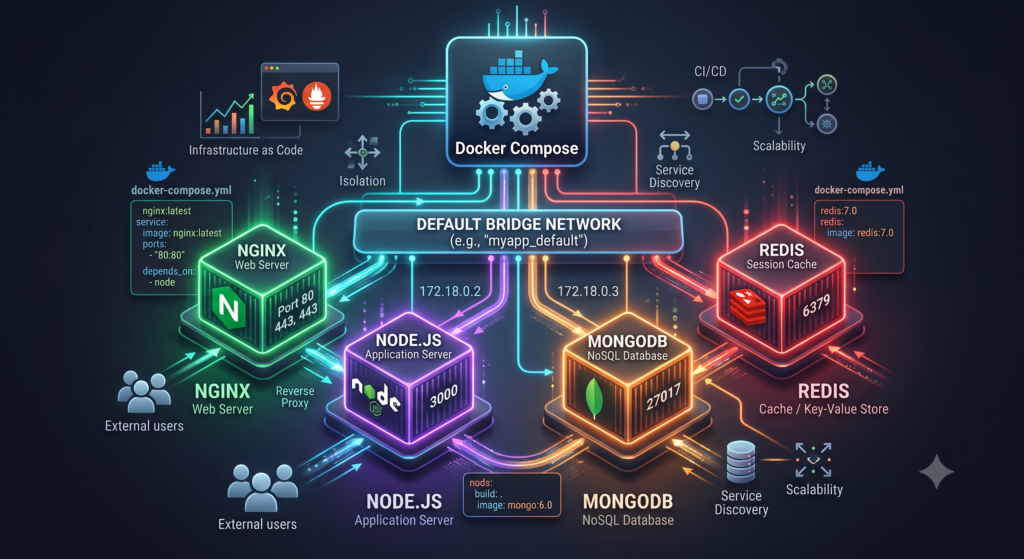
One of the biggest advantages of Docker Compose is automatic networking. Every service defined in the docker-compose.yml file joins the same default network unless you specify otherwise.
This means containers can communicate with each other using their service names instead of IP addresses. Since container IPs may change every time they restart, Docker Compose provides built-in DNS resolution that keeps communication stable. Read below Docker Compose Tutorial :
Example:
services:
  backend:
    build: .

  database:
    image: mongo
Here, the backend container can connect to MongoDB simply by using:
mongodb://database:27017
Notice that database is the service name, not an IP address.
Creating a Custom Network
version: "3.9"

services:
  frontend:
    image: nginx
    networks:
      - app-network

  backend:
    build: .
    networks:
      - app-network

networks:
  app-network:
Benefits of custom networks:
- Better isolation
- Improved security
- Easier service discovery
- Cleaner project organization
Docker Compose Tutorial: Understanding Volumes
This Docker Compose Tutorial also explains Docker volumes. Containers are temporary by design. If a container is deleted, everything stored inside it disappears unless you use volumes.
Volumes provide persistent storage.
Example:
services:
  mongodb:
    image: mongo

    volumes:
      - mongo-data:/data/db

volumes:
  mongo-data:
Now even if the MongoDB container is removed, your database remains safe.
Bind Mount Example
services:
  backend:

    build: .

    volumes:
      - ./src:/app/src
This is extremely useful during development because code changes appear immediately inside the running container.
Types of Volumes
Named Volumes
Managed by Docker.
Example:
volumes:
  mysql-data:
Advantages
- Persistent
- Easy backup
- Portable
- Recommended for databases
Bind Mounts
Maps a folder from your computer.
Example
./project:/app
Advantages
- Instant code updates
- Great for development
- Easy debugging
Anonymous Volumes
Automatically created by Docker.
Usually used only temporarily.
Environment Variables
Environment variables help keep configuration separate from application code.
Instead of hardcoding credentials, place them in a .env file.
Example:
DB_HOST=database
DB_PORT=27017
DB_NAME=mydb
Compose file:
services:

  backend:

    build: .

    env_file:
      - .env
Or directly:
environment:

  NODE_ENV: production

  PORT: 3000
Keeping secrets outside source code is a recommended DevOps practice.
Using .env Files
Example:
MYSQL_ROOT_PASSWORD=password

MYSQL_DATABASE=clouddevops

API_KEY=examplekey
Reference inside Compose:
environment:

  MYSQL_ROOT_PASSWORD: ${MYSQL_ROOT_PASSWORD}

  MYSQL_DATABASE: ${MYSQL_DATABASE}
Benefits:
- Cleaner configuration
- Better security
- Easier deployment
- Different environments can use different values
Essential Docker Compose Tutorial Commands
The complete Docker Compose Tutorial covers every important command. These are the commands every DevOps engineer should know.
Start Containers
docker compose up
Start in Background
docker compose up -d
Stop Containers
docker compose stop
Remove Containers
docker compose down
Restart Services
docker compose restart
Build Images
docker compose build
View Running Containers
docker compose ps
View Logs
docker compose logs
Specific service:
docker compose logs backend
Execute Commands
docker compose exec backend bash
Pull Latest Images
docker compose pull
List Networks
docker network ls
List Volumes
docker volume ls
Docker Compose Tutorial : Complete MERN Stack Example
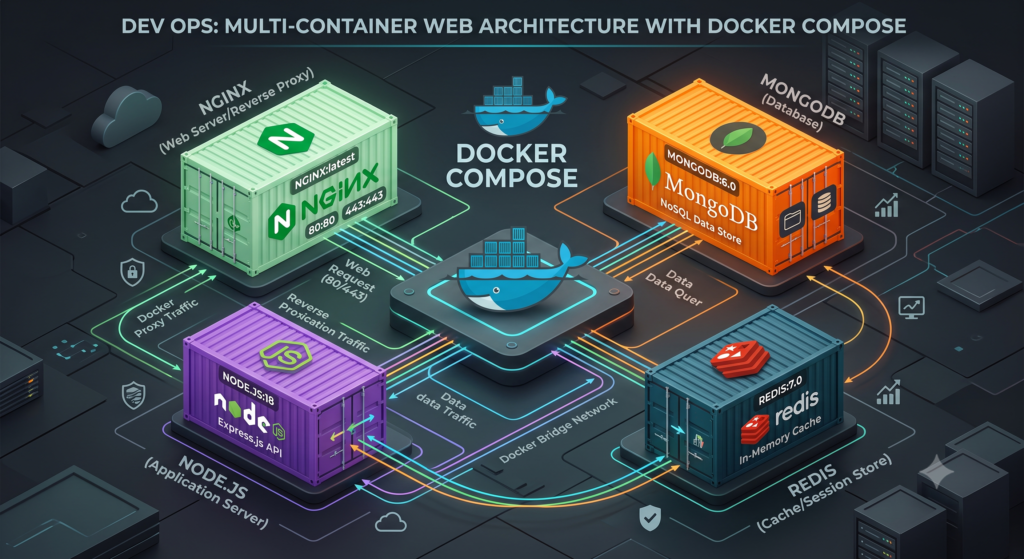
version: "3.9"

services:

  frontend:

    build: ./frontend

    ports:

      - "3000:3000"

  backend:

    build: ./backend

    ports:

      - "5000:5000"

    depends_on:

      - mongodb

  mongodb:

    image: mongo

    ports:

      - "27017:27017"

    volumes:

      - mongo-data:/data/db

volumes:

  mongo-data:
With one command:
docker compose up
Your complete MERN application starts automatically.
Restart Policies
Restart policies increase reliability.
Example:
restart: always
Available policies:
- always
- unless-stopped
- on-failure
- no
Using restart policies helps recover automatically after crashes.
Health Checks
Health checks determine whether a container is functioning correctly.
Example:
healthcheck:

  test: ["CMD", "curl", "-f", "http://localhost"]

  interval: 30s

  timeout: 10s

  retries: 5
Benefits:
- Detect unhealthy containers
- Automatic recovery
- Better production stability
Docker Compose Tutorial Best Practices
Follow these recommendations to keep your projects clean and maintainable.
- Keep one service per container.
- Never store passwords inside the Compose file.
- Use environment variables for configuration.
- Use named volumes for databases.
- Keep Docker images lightweight.
- Use official images whenever possible.
- Pin image versions instead of relying on
latest. - Organize large Compose files with comments.
- Remove unused images and volumes regularly.
- Test locally before production deployment.
These practices make Docker Compose projects easier to maintain as they grow.
Advanced Docker Compose Features
As your applications grow, Docker Compose offers advanced features that simplify deployment and maintenance.
Multiple Compose Files
You can maintain separate configuration files for different environments.
Example:
docker-compose.yml
docker-compose.dev.yml
docker-compose.prod.yml
Run them together:
docker compose -f docker-compose.yml -f docker-compose.prod.yml up -d
This approach allows you to customize configurations for development, testing, and production without modifying the primary Compose file.
Scaling Services
Docker Compose allows you to run multiple instances of a service.
Example:
docker compose up --scale backend=3
This command creates three backend containers, which is useful for testing load balancing and improving application availability.
Container Dependencies
Sometimes one service depends on another.
Example:
services:

  backend:

    build: .

    depends_on:

      - mongodb

  mongodb:

    image: mongo
The backend container waits until MongoDB starts before launching.
Resource Limits
To prevent containers from consuming excessive system resources:
services:

  backend:

    deploy:

      resources:

        limits:

          cpus: '1'

          memory: 512M
This improves stability when multiple services run on the same host.
Docker Compose Tutorial :Production Deployment Tips
Although Docker Compose is commonly used for development, many organizations also use it for small production environments.
Best practices include:
- Use official Docker images.
- Pin image versions instead of using
latest. - Store secrets securely.
- Enable HTTPS with a reverse proxy.
- Configure restart policies.
- Back up Docker volumes regularly.
- Monitor logs continuously.
- Keep Docker Engine updated.
- Scan images for vulnerabilities.
- Separate development and production Compose files.
Logging in Docker Compose
Logs help diagnose issues quickly.
View logs:
docker compose logs
Follow logs continuously:
docker compose logs -f
Logs for a specific service:
docker compose logs backend
Checking logs should always be your first troubleshooting step.
Troubleshooting Common Docker Compose Issues
Port Already in Use
Error:
Bind for 0.0.0.0:3000 failed
Solution:
- Stop the application using that port.
- Change the host port.
- Restart Docker if necessary.
Container Exits Immediately
Possible causes:
- Incorrect startup command.
- Missing environment variables.
- Application crashes.
- Missing files.
Inspect logs:
docker compose logs
Database Connection Failed
Verify:
- Service name is correct.
- Containers are on the same network.
- Database is fully initialized.
- Credentials are correct.
Volume Permission Errors
Possible solutions:
- Verify directory ownership.
- Check file permissions.
- Recreate the volume if necessary.
Build Failures
Try rebuilding without cache.
docker compose build --no-cache
Then start again.
docker compose up
Docker Compose vs Kubernetes
Many beginners wonder whether they should learn Docker Compose or Kubernetes first.
| Feature | Docker Compose | Kubernetes |
|---|---|---|
| Learning Curve | Easy | Advanced |
| Setup | Simple | Complex |
| Best For | Development | Production |
| Scaling | Limited | Excellent |
| Self Healing | Basic | Advanced |
| Load Balancing | Limited | Built-in |
| Rolling Updates | No | Yes |
| Enterprise Usage | Small Projects | Large Scale Systems |
Which One Should You Learn?
Start with Docker Compose if:
- You are new to containers.
- You build local development environments.
- You work on personal projects.
- You develop MERN applications.
Learn Kubernetes after mastering Docker Compose because Kubernetes concepts become much easier to understand.
Security Best Practices
Security should never be ignored.
Follow these recommendations:
- Avoid running containers as the root user.
- Keep Docker images updated.
- Remove unused images regularly.
- Store secrets outside the Compose file.
- Limit exposed ports.
- Use trusted Docker Hub images.
- Enable HTTPS for production.
- Scan images for vulnerabilities.
- Restrict unnecessary privileges.
- Regularly update Docker Engine.
Performance Optimization
To improve Docker Compose performance:
- Use lightweight base images like Alpine Linux.
- Minimize image layers.
- Enable build caching.
- Remove unused containers.
- Remove dangling images.
- Use named volumes.
- Limit CPU and memory usage.
- Optimize application startup time.
Real-World Use Cases
Docker Compose is widely used in many scenarios.
MERN Stack Development
Run React, Node.js, Express, MongoDB, and Redis with one command.
WordPress Development
Launch WordPress, MySQL, and phpMyAdmin instantly.
Microservices
Manage multiple backend APIs and supporting services.
CI/CD Testing
Create isolated environments for automated testing.
Machine Learning
Deploy Jupyter Notebook, TensorFlow, and databases together.
Monitoring Stack
Run Prometheus, Grafana, Loki, and Alertmanager using a single Compose file.
Why Learn Docker Compose?
Learning Docker Compose provides several career benefits.
- Essential DevOps skill.
- Frequently used in technical interviews.
- Required for modern backend development.
- Improves development productivity.
- Simplifies multi-container applications.
- Builds a strong foundation before Kubernetes.
- Widely adopted in startups and enterprises.
- Valuable for freelance and cloud engineering roles.
If you are preparing for DevOps interviews, Docker Compose is one of the most practical tools to master.
Frequently Asked Questions (FAQ)
1. What is Docker Compose?
Docker Compose is a tool for defining and managing multi-container Docker applications using a single YAML configuration file.
2. Is Docker Compose free?
Yes. Docker Compose is included with Docker Desktop and is available as an open-source tool.
3. Is Docker Compose used in production?
Yes. Small and medium-sized applications often use Docker Compose in production, while larger enterprise systems typically use Kubernetes.
4. What file does Docker Compose use?
Docker Compose uses a file named:docker-compose.yml
5. What command starts all containers?
docker compose up
6. How do I stop containers?
docker compose down
7. Does Docker Compose create networks automatically?
Yes. Docker Compose automatically creates a network for services unless you define a custom one.
8. Can Docker Compose manage databases?
Absolutely. It can manage MySQL, PostgreSQL, MongoDB, Redis, MariaDB, and many other database containers.
9. What is the difference between Docker and Docker Compose?
Docker manages individual containers, while Docker Compose manages multiple related containers together using a single configuration file.
10.Should beginners learn Docker Compose before Kubernetes?
Yes. Docker Compose is significantly easier to learn and provides a solid foundation for understanding container orchestration before moving to Kubernetes.
Official Docs
- https://docs.docker.com/
- https://docs.docker.com/compose/
- https://hub.docker.com/
- https://github.com/docker/compose
Conclusion
This Docker Compose Tutorial covered everything from the fundamentals to advanced concepts, making it a complete learning resource for beginners and experienced developers alike. You learned how Docker Compose simplifies multi-container application management through a single YAML configuration file, explored services, networks, volumes, environment variables, useful commands, best practices, troubleshooting techniques, and production deployment strategies.
Mastering Docker Compose Tutorial concepts will significantly improve your workflow by allowing you to build consistent, reproducible development environments with minimal effort. As your applications become more complex, Docker Compose remains an indispensable tool for local development, testing, and even many production deployments.
If your long-term goal is to become a Cloud or DevOps Engineer, learning Docker Compose Tutorial is an essential milestone. Once you are comfortable managing multi-container applications with Docker Compose, transitioning to Kubernetes and other container orchestration platforms becomes much easier.
Continue practicing by creating your own projects, experimenting with different services, and integrating Docker Compose into CI/CD pipelines. Consistent hands-on experience is the fastest way to build confidence and prepare for real-world DevOps roles.