
Cloud computing has transformed how businesses build, deploy, and manage applications. Organizations no longer need to purchase expensive hardware, maintain large data centers, or worry about infrastructure scaling. Instead, cloud providers offer computing resources on demand, helping companies innovate faster and reduce operational costs.
Among the leading cloud platforms available today, Azure Cloud Computing has become one of the most widely adopted solutions across enterprises, startups, educational institutions, and government organizations. Developed by Microsoft, Azure provides a comprehensive set of cloud services that enable businesses to build, deploy, and manage applications globally.
Whether you are a student exploring cloud technology, a software developer building scalable applications, a DevOps engineer automating infrastructure, or an organization planning digital transformation, understanding Azure Cloud Computing is an essential skill in 2026.
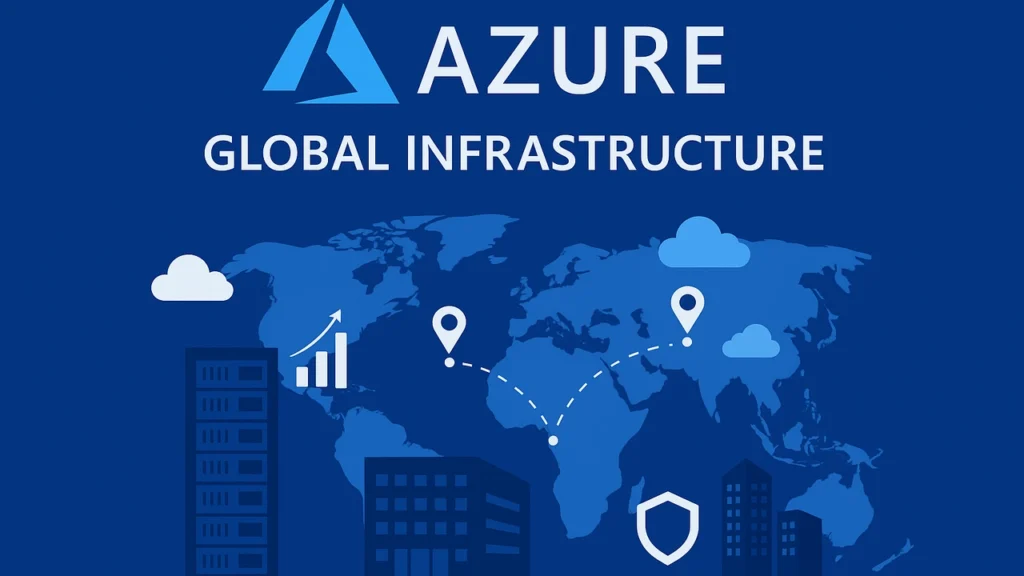
Table of Contents
- What is Azure Cloud Computing?
- History of Microsoft Azure
- Why Azure Cloud Computing is Important
- Azure Global Infrastructure
- Azure Regions and Availability Zones
- Core Azure Services
- Azure Compute Services
- Azure Storage Services
- Azure Networking Services
- Benefits of Azure Cloud Computing
- Azure Security Features
- Azure Pricing Model
- Azure and DevOps
- Azure AI Services
- Azure Career Opportunities
- Frequently Asked Questions
- Conclusion
What is Azure Cloud Computing?
Azure Cloud Computing is Microsoft’s cloud platform that provides a wide range of services including computing, networking, storage, databases, analytics, artificial intelligence, machine learning, security, and DevOps tools.
Instead of purchasing physical servers, organizations can rent cloud resources from Azure and pay only for what they use.
Azure enables businesses to:
- Host websites
- Deploy applications
- Store data securely
- Build AI-powered solutions
- Run virtual machines
- Create Kubernetes clusters
- Manage databases
- Implement disaster recovery solutions
- Monitor cloud infrastructure
Today, Azure Cloud Computing supports hundreds of services used by millions of customers worldwide.
History of Microsoft Azure
Microsoft announced Azure in 2008 under the name “Windows Azure.”
The platform was officially launched in 2010 and later rebranded as Microsoft Azure.
Since then, Azure has evolved significantly:
2008
Azure announced by Microsoft.
2010
Commercial launch of Azure platform.
2014
Renamed from Windows Azure to Microsoft Azure.
2018
Expansion into AI and machine learning services.
2021
Major growth in hybrid cloud adoption.
2024-2026
Strong focus on AI infrastructure, OpenAI integration, and enterprise cloud modernization.
Azure is now considered one of the top cloud providers alongside:
Microsoft Azure Official Documentation
Why Azure Cloud Computing is Important
The popularity of Azure Cloud Computing continues to grow because organizations require scalable, secure, and globally available cloud solutions.
Key reasons businesses choose Azure include:
Scalability
Resources can scale automatically based on demand.
Cost Optimization
Pay-as-you-go pricing reduces infrastructure expenses.
Reliability
High availability ensures applications remain operational.
Security
Advanced security controls protect business data.
Hybrid Cloud Support
Azure integrates seamlessly with on-premises environments.
AI Integration
Organizations can leverage artificial intelligence without building infrastructure from scratch.
Azure Global Infrastructure
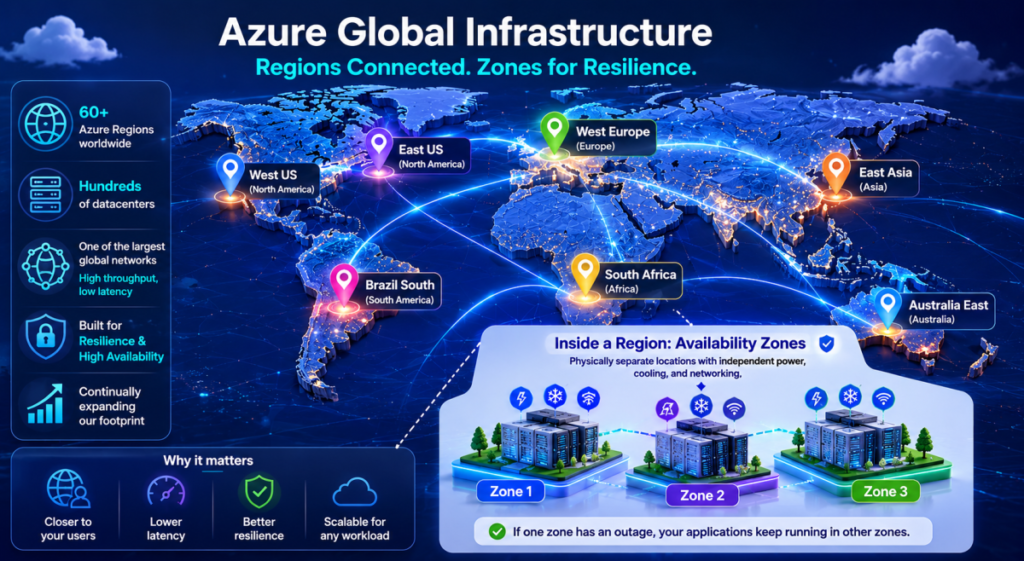
One of the biggest strengths of Azure Cloud Computing is its massive global infrastructure.
Azure operates hundreds of data centers distributed across multiple geographical locations worldwide.
This infrastructure allows organizations to:
- Reduce latency
- Improve performance
- Achieve regulatory compliance
- Enhance disaster recovery
- Deliver services globally
Azure’s infrastructure consists of:
Regions
Physical locations containing one or more data centers.
Availability Zones
Independent facilities within a region.
Edge Locations
Used for content delivery and low-latency services.
Global Network Backbone
Microsoft’s private network connecting Azure data centers worldwide.
Azure Regions and Availability Zones
Understanding Azure Regions is fundamental when learning Azure Cloud Computing.
A region is a geographic area containing one or more Azure data centers.
Examples include:
- East US
- West US
- Central India
- South India
- North Europe
- Southeast Asia
When deploying applications, organizations choose regions closest to their users.
Benefits include:
Lower Latency
Users experience faster response times.
Compliance Requirements
Data can remain within specific geographic boundaries.
Improved Availability
Applications remain available even if one data center experiences issues.
What Are Availability Zones?
Availability Zones are physically separate facilities within an Azure region.
Each zone contains:
- Independent power systems
- Independent networking
- Independent cooling systems
Benefits:
- High availability
- Fault tolerance
- Business continuity
For mission-critical applications, deploying resources across multiple availability zones is a best practice.
Core Azure Services
The success of Azure Cloud Computing comes from its extensive portfolio of services.
Azure services can be grouped into several categories:
Compute
Resources for running applications and workloads.
Storage
Services for storing files, databases, and backups.
Networking
Connectivity solutions for cloud environments.
Databases
Managed database services.
Security
Identity and access management solutions.
AI and Machine Learning
Intelligent services for modern applications.
DevOps
Tools for continuous integration and deployment.
Analytics
Services for processing and analyzing data.
Azure Compute Services
Compute services form the foundation of Azure Cloud Computing.
These services provide processing power required to run applications.
Azure Virtual Machines
Azure Virtual Machines allow users to run Windows or Linux servers in the cloud.
Common use cases:
- Application hosting
- Development environments
- Legacy workload migration
- Testing environments
Benefits:
- Full administrative control
- Flexible configurations
- High scalability
Azure App Service
Azure App Service enables developers to deploy web applications without managing infrastructure.
Features include:
- Automatic scaling
- Integrated security
- CI/CD support
- Monitoring capabilities
This service is popular among web developers building modern applications.
Azure Functions
Azure Functions provides serverless computing capabilities.
Developers can execute code without provisioning servers.
Advantages:
- Reduced operational overhead
- Automatic scaling
- Pay only for execution time
Popular use cases:
- Automation
- Event processing
- API development
Azure Kubernetes Service (AKS)
Containerization has become essential in modern software development.
Azure Kubernetes Service simplifies Kubernetes deployment and management.
Benefits include:
- Automated upgrades
- Integrated monitoring
- High scalability
- Enhanced security
AKS is widely used by DevOps teams implementing cloud-native architectures.
Azure Storage Services
Data storage is another critical component of Azure Cloud Computing.
Azure offers multiple storage solutions.
Azure Blob Storage
Designed for storing unstructured data such as:
- Images
- Videos
- Documents
- Backups
Benefits:
- High durability
- Global accessibility
- Cost efficiency
Azure File Storage
Provides managed file shares accessible from multiple systems.
Suitable for:
- Shared application data
- Lift-and-shift migrations
- Enterprise file storage
Azure Disk Storage
Used primarily with Azure Virtual Machines.
Provides:
- High performance
- Persistent storage
- Backup integration
Azure Queue Storage
Supports asynchronous communication between application components.
Common use cases include:
- Background processing
- Order management systems
- Workflow automation
Azure Networking Services
Networking plays a crucial role in Azure Cloud Computing.
Azure networking services help organizations securely connect resources.
Virtual Network (VNet)
Azure Virtual Network acts as a private network within Azure.
Benefits:
- Isolation
- Security
- Resource communication
Azure Load Balancer
Distributes incoming traffic across multiple resources.
Advantages:
- Improved performance
- Increased availability
- Better fault tolerance
Azure Application Gateway
Provides advanced web traffic management.
Features:
- SSL termination
- Web application firewall
- URL-based routing
Azure DNS
Enables domain name management within Azure.
Benefits:
- Reliability
- Fast resolution
- Global accessibility
Related Articles
Cloud Computing vs DevOps: What’s the Difference?
Best DevOps Tools Every Engineer Should Learn
How Kubernetes Works in Modern Cloud Infrastructure
Artificial Intelligence in Cloud Computing
Azure Security, Pricing, DevOps, AI, and Career Opportunities
Azure Security Features
Security remains one of the most important considerations when organizations adopt cloud technologies. One reason businesses trust Azure Cloud Computing is Microsoft’s significant investment in cybersecurity, compliance, and data protection.
Azure provides a multi-layered security model designed to protect applications, infrastructure, and sensitive business data.
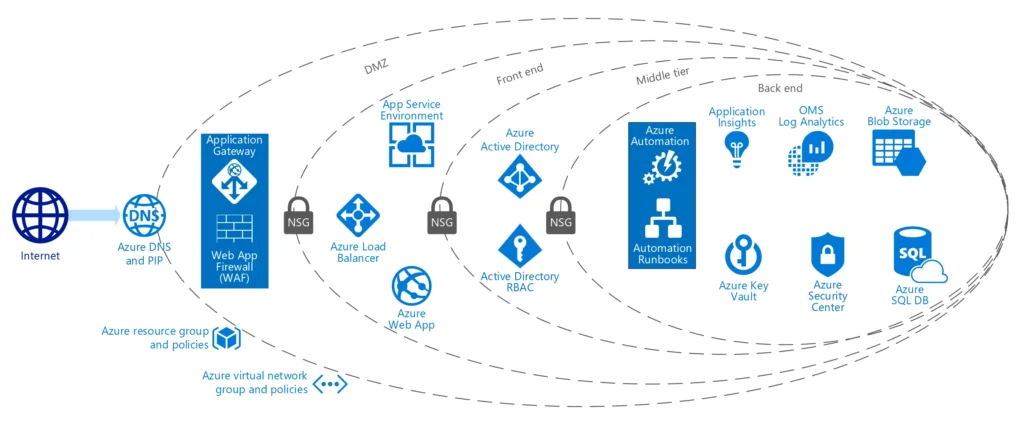
Azure Active Directory (Azure AD)
Azure Active Directory is Microsoft’s cloud-based identity and access management service.
It helps organizations manage:
- User authentication
- Authorization
- Single Sign-On (SSO)
- Multi-Factor Authentication (MFA)
- Identity governance
Benefits include:
Enhanced Security
Users can securely access resources without repeatedly entering credentials.
Centralized Management
Administrators can manage thousands of users from a single dashboard.
Integration with Applications
Azure AD integrates with thousands of cloud and enterprise applications.
For organizations adopting Azure Cloud Computing, Azure AD is often one of the first services implemented.
Multi-Factor Authentication (MFA)
Passwords alone are no longer sufficient protection.
Azure MFA requires users to verify their identity through additional methods such as:
- Mobile applications
- SMS verification
- Phone calls
- Hardware tokens
This significantly reduces the risk of unauthorized access.
Azure Key Vault
Applications frequently require sensitive information such as:
- API keys
- Database passwords
- Encryption keys
- Certificates
Azure Key Vault securely stores and manages these secrets.
Benefits:
- Centralized secret management
- Automated certificate renewal
- Improved compliance
- Reduced security risks
Microsoft Defender for Cloud
Microsoft Defender for Cloud provides advanced threat protection and security monitoring.
Capabilities include:
- Security posture assessment
- Vulnerability management
- Threat detection
- Compliance reporting
Organizations using Azure Cloud Computing can proactively identify and address security issues before they become major incidents.
Azure Compliance Certifications
Many industries require strict regulatory compliance.
Azure supports standards such as:
- ISO 27001
- SOC 1
- SOC 2
- GDPR
- HIPAA
- PCI DSS
This makes Azure suitable for industries such as:
- Healthcare
- Banking
- Government
- Education
- Retail
Azure Pricing Model
One major advantage of Azure Cloud Computing is its flexible pricing structure.
Organizations only pay for the resources they consume.
This eliminates large upfront investments in infrastructure.
Pay-As-You-Go Model
Under this model, businesses pay based on usage.
Examples include:
- Compute hours consumed
- Storage used
- Network bandwidth utilized
This pricing model is ideal for startups and growing businesses.
Reserved Instances
Organizations with predictable workloads can purchase reserved instances.
Benefits include:
- Lower costs
- Predictable billing
- Long-term savings
Reserved instances can significantly reduce cloud expenses.
Spot Virtual Machines
Azure offers unused compute capacity at discounted rates.
Suitable for:
- Testing environments
- Batch processing
- Research workloads
These resources can be interrupted when Azure requires capacity elsewhere.
Cost Optimization Best Practices
When implementing Azure Cloud Computing, organizations should follow cost optimization strategies.
Right-Size Resources
Avoid over-provisioning virtual machines.
Use Auto Scaling
Automatically increase or decrease resources based on demand.
Monitor Usage
Track resource consumption regularly.
Remove Unused Resources
Delete unused storage, virtual machines, and networking components.
Use Reserved Capacity
Reduce long-term operational costs.
Azure and DevOps
Modern software development relies heavily on DevOps practices.
The integration between DevOps and Azure Cloud Computing enables organizations to deliver software faster and more reliably.
What is DevOps?
DevOps combines development and operations teams to improve collaboration and automation.
Goals include:
- Faster deployments
- Improved quality
- Reduced downtime
- Continuous improvement
Azure provides multiple services that support DevOps workflows.
Azure DevOps
Azure DevOps is a comprehensive platform that supports software development lifecycle management.
Key components include:
Azure Repos
Source code management using Git repositories.
Azure Pipelines
Continuous Integration and Continuous Deployment (CI/CD).
Azure Boards
Project planning and work tracking.
Azure Test Plans
Application testing management.
Azure Artifacts
Package management and distribution.
These tools help organizations implement DevOps practices efficiently within Azure Cloud Computing environments.
CI/CD with Azure Pipelines
Continuous Integration and Continuous Deployment are essential DevOps practices.
A typical Azure Pipeline workflow includes:
- Developer commits code.
- Automated build process starts.
- Automated tests execute.
- Application is packaged.
- Deployment occurs automatically.
Benefits include:
- Faster releases
- Improved quality
- Reduced manual effort
- Consistent deployments
Infrastructure as Code (IaC)
Infrastructure as Code allows teams to manage cloud resources using code.
Popular Azure IaC tools include:
- ARM Templates
- Bicep
- Terraform
Benefits:
- Repeatable deployments
- Version control
- Reduced configuration errors
- Improved automation
Infrastructure as Code has become a fundamental skill for professionals working with Azure Cloud Computing.
Containers and Kubernetes
Containerization enables applications to run consistently across environments.
Azure supports containerized workloads through:
- Azure Kubernetes Service (AKS)
- Azure Container Apps
- Azure Container Registry
Benefits include:
- Portability
- Scalability
- Faster deployments
- Efficient resource utilization
Azure AI and Machine Learning Services
Artificial Intelligence is transforming industries worldwide.
One area where Azure Cloud Computing has expanded rapidly is AI and machine learning.
Microsoft provides a variety of AI services that allow businesses to build intelligent applications.
Azure AI Services
Azure AI Services provide pre-built AI capabilities.
Examples include:
Vision AI
Analyze and interpret images.
Speech Services
Convert speech to text and text to speech.
Language Services
Process and understand human language.
Translation Services
Translate content across multiple languages.
These services help developers integrate AI into applications quickly.
Azure Machine Learning
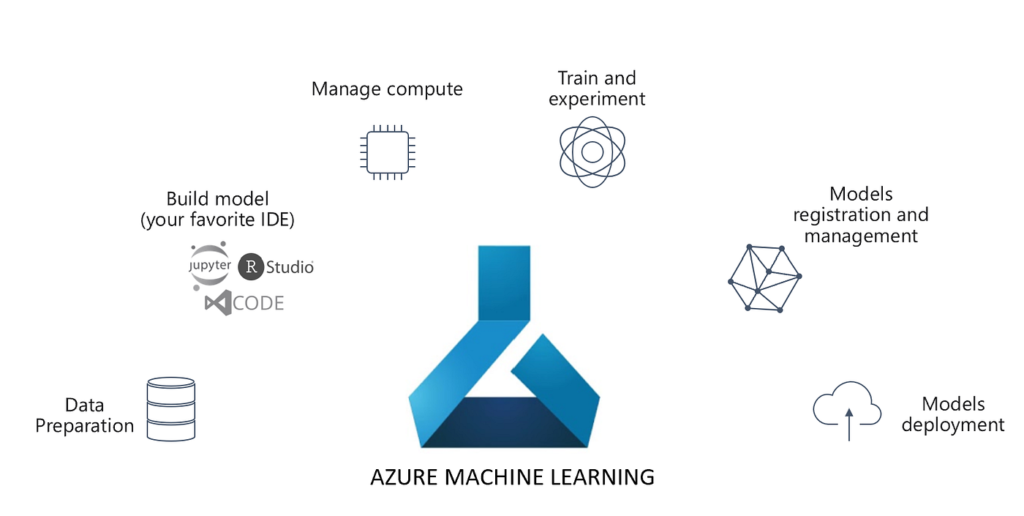
Azure Machine Learning is a platform for building, training, and deploying machine learning models.
Capabilities include:
- Data preparation
- Model training
- Experiment tracking
- Model deployment
- Monitoring
Organizations using Azure Cloud Computing can accelerate AI development without managing complex infrastructure.
Azure OpenAI Service
One of Microsoft’s most popular AI offerings is Azure OpenAI Service.
It provides access to advanced language models that support:
- Chatbots
- Content generation
- Code assistance
- Data analysis
- Customer support automation
Businesses increasingly leverage Azure OpenAI to improve productivity and customer experiences.
AI Use Cases in Azure
Common use cases include:
Customer Service Automation
AI-powered chatbots reduce support workload.
Predictive Analytics
Forecast business trends and customer behavior.
Document Processing
Extract information from documents automatically.
Recommendation Engines
Provide personalized user experiences.
Fraud Detection
Identify suspicious activities in real time.
Career Opportunities in Azure Cloud Computing
The demand for cloud professionals continues to grow globally.
Organizations are actively hiring professionals with expertise in Azure Cloud Computing.
Why Learn Azure?
Learning Azure offers several benefits:
- High industry demand
- Attractive salaries
- Diverse career paths
- Global opportunities
- Future-proof skills
Cloud expertise is increasingly becoming a requirement for modern IT professionals.
Popular Azure Job Roles
Azure Administrator
Responsible for managing Azure resources and infrastructure.
Azure Solutions Architect
Designs cloud solutions that meet business requirements.
Azure DevOps Engineer
Implements automation, CI/CD, and infrastructure management.
Cloud Engineer
Builds and maintains cloud environments.
Site Reliability Engineer (SRE)
Focuses on reliability, scalability, and performance.
Azure Security Engineer
Protects cloud environments from threats.
AI Engineer
Develops AI-powered applications using Azure services.
Azure Certifications
Microsoft certifications validate cloud skills and improve employability.
Popular certifications include:
Azure Fundamentals (AZ-900)
Ideal for beginners.
Azure Administrator Associate (AZ-104)
Focused on Azure administration.
Azure Developer Associate (AZ-204)
Designed for developers.
Azure Security Engineer (AZ-500)
Focused on cloud security.
Azure Solutions Architect Expert (AZ-305)
Advanced architecture certification.
Professionals with these certifications often gain a competitive advantage in the job market.
Skills Required for Azure Careers
To succeed in Azure Cloud Computing, professionals should develop skills in:
- Linux
- Networking
- Cloud Architecture
- DevOps
- Docker
- Kubernetes
- Terraform
- Security
- Monitoring
- CI/CD Pipelines
Combining these skills with Azure expertise creates strong career opportunities.
Advanced Azure Services, Best Practices, Migration Strategy, FAQs & Conclusion
Advanced Azure Services
As organizations mature in their cloud journey, they often move beyond basic infrastructure services and begin leveraging advanced capabilities offered by Azure Cloud Computing.
These advanced services help businesses improve scalability, automation, analytics, and operational efficiency.
Azure SQL Database
Azure SQL Database is a fully managed relational database service.
Benefits include:
- Automatic backups
- Built-in security
- High availability
- Automatic patching
- Scalability
Organizations can focus on application development rather than database maintenance.
Common use cases:
- Enterprise applications
- E-commerce platforms
- Financial systems
- Customer management systems
Azure Cosmos DB
Azure Cosmos DB is Microsoft’s globally distributed NoSQL database service.
Features include:
- Multi-region replication
- Low latency
- Automatic scaling
- High availability
It is commonly used for:
- Real-time applications
- IoT platforms
- Gaming applications
- Global SaaS products
Many modern applications built on Azure Cloud Computing use Cosmos DB to handle large-scale workloads.
Azure Synapse Analytics
Organizations generate enormous amounts of data every day.
Azure Synapse Analytics helps businesses:
- Collect data
- Analyze information
- Generate reports
- Support decision-making
Benefits include:
- Big data processing
- Data warehousing
- Business intelligence
- Advanced analytics
Azure Data Factory
Azure Data Factory enables organizations to move and transform data between systems.
Capabilities include:
- Data integration
- ETL processes
- Workflow automation
- Data migration
Businesses often use Azure Data Factory when modernizing their data platforms.
Azure Monitor
Monitoring is critical for maintaining healthy cloud environments.
Azure Monitor helps teams:
- Track performance
- Detect issues
- Analyze logs
- Monitor application health
Benefits include:
- Faster troubleshooting
- Improved reliability
- Better operational visibility
Azure Backup
Data protection remains essential for every organization.
Azure Backup provides:
- Automated backups
- Long-term retention
- Secure storage
- Disaster recovery support
This service helps ensure business continuity in case of failures or cyberattacks.
Azure Cloud Migration Strategy
Many organizations begin their cloud journey by migrating existing systems to Azure.
A successful migration strategy minimizes risks and reduces downtime.
Step 1: Assessment
Before migration, organizations should evaluate:
- Existing infrastructure
- Application dependencies
- Storage requirements
- Security needs
- Compliance requirements
This assessment helps determine the most suitable Azure services.
Step 2: Planning
Migration planning should include:
- Resource mapping
- Cost estimation
- Migration timeline
- Risk analysis
- Testing strategy
Careful planning increases the success rate of Azure Cloud Computing adoption.
Step 3: Migration
Common migration approaches include:
Rehost (Lift and Shift)
Move applications without major changes.
Refactor
Modify applications slightly for cloud optimization.
Re-Architect
Redesign applications for cloud-native architecture.
Rebuild
Develop entirely new cloud-native applications.
Step 4: Optimization
After migration, organizations should:
- Optimize performance
- Improve security
- Reduce costs
- Implement monitoring
- Enable automation
This stage ensures maximum value from Azure Cloud Computing investments.
Azure Best Practices
Organizations that follow cloud best practices achieve better outcomes.
Implement Strong Security Controls
Always:
- Enable Multi-Factor Authentication
- Use Role-Based Access Control
- Protect secrets with Key Vault
- Monitor security alerts
Use Infrastructure as Code
Infrastructure should be deployed using:
- Terraform
- Bicep
- ARM Templates
Benefits include:
- Consistency
- Automation
- Faster deployments
Enable Monitoring
Use Azure Monitor and Log Analytics to:
- Detect issues quickly
- Analyze performance
- Improve reliability
Automate Deployments
Implement CI/CD pipelines using Azure DevOps.
Benefits include:
- Faster releases
- Reduced errors
- Improved quality
Design for High Availability
Deploy workloads across:
- Availability Zones
- Multiple regions
- Load-balanced environments
This minimizes downtime and improves resilience.
Optimize Costs Regularly
Review:
- Unused resources
- Over-provisioned services
- Storage utilization
Cost optimization is a continuous process within Azure Cloud Computing environments.
Common Challenges in Azure Adoption
While Azure offers numerous benefits, organizations may face challenges.
Skill Gaps
Cloud technologies require specialized knowledge.
Solution:
- Training programs
- Certifications
- Hands-on projects
Cost Management
Poor resource management can increase cloud expenses.
Solution:
- Budget monitoring
- Cost alerts
- Resource optimization
Security Misconfigurations
Improper configurations may expose sensitive data.
Solution:
- Security assessments
- Governance policies
- Continuous monitoring
Migration Complexity
Legacy applications may require extensive modifications.
Solution:
- Detailed planning
- Pilot migrations
- Expert guidance
Future of Azure Cloud Computing
The future of Azure Cloud Computing looks extremely promising.
Several trends are expected to shape Azure’s growth.
Artificial Intelligence Expansion
Microsoft continues investing heavily in:
- Generative AI
- Large Language Models
- Intelligent automation
AI services will become increasingly integrated into business applications.
Cloud-Native Development
Organizations are moving toward:
- Containers
- Kubernetes
- Serverless computing
Azure provides strong support for cloud-native architectures.
Hybrid Cloud Growth
Many businesses prefer combining:
- On-premises infrastructure
- Public cloud services
Edge Computing
Processing data closer to users improves:
- Performance
- Reliability
- User experience
Azure continues expanding its edge computing ecosystem.
Enhanced Security
Cybersecurity threats continue evolving.
Microsoft invests billions annually in security innovations to protect Azure customers.
Conclusion
Cloud technology continues to transform the way organizations operate, innovate, and deliver value to customers. Among the leading cloud platforms available today, Azure Cloud Computing stands out because of its extensive service portfolio, enterprise-grade security, global infrastructure, AI capabilities, and strong integration with Microsoft’s ecosystem.
From hosting applications and managing databases to deploying Kubernetes clusters and building AI-powered solutions, Azure Cloud Computing provides organizations with the tools needed to succeed in the digital era.
For students, developers, system administrators, DevOps engineers, and business leaders, learning Azure Cloud Computing is an investment that can create long-term career and business opportunities.
As cloud adoption continues accelerating worldwide, Azure is expected to remain one of the most influential cloud platforms shaping the future of technology.
Azure’s hybrid cloud capabilities remain a major competitive advantage.
Frequently Asked Questions (FAQ)
What is Azure Cloud Computing?
Azure Cloud Computing is Microsoft’s cloud platform that provides services for computing, storage, networking, databases, AI, analytics, and application development.
Is Azure better than AWS?
Both platforms are excellent. AWS has a larger market share, while Azure is often preferred by organizations already using Microsoft technologies.
Is Azure good for beginners?
Yes. Azure offers beginner-friendly services, free learning resources, and certification paths such as AZ-900.
What programming languages are supported by Azure?
Azure supports:
Python
Java
JavaScript
TypeScript
C#
Go
PHP
Ruby1
What is Azure DevOps?
Azure DevOps is a suite of tools that supports software development, project management, testing, and CI/CD automation.
Does Azure Yes. Azure Kubernetes Service (AKS) is one of the most popular managed Kubernetes platforms available today.support Kubernetes?
Yes. Azure Kubernetes Service (AKS) is one of the most popular managed Kubernetes platforms available today.
Is Azure secure?
Yes. Azure provides advanced security features including:
Azure Active Directory
Key Vault
Defender for Cloud
Multi-Factor Authentication
Can small businesses use Azure?
Absolutely. Azure’s pay-as-you-go model makes it accessible for startups and small businesses.
Which Azure certification should beginners start with?
Most beginners start with:
Microsoft Azure Fundamentals (AZ-900)
This certification introduces core cloud concepts and Azure services.
Is Azure Cloud Computing a good career choice in 2026?
Yes. Demand for Azure professionals continues to grow globally across cloud engineering, DevOps, security, and AI roles.
Interested in building a career in Cloud, DevOps, Kubernetes, Terraform, AI, and Azure?
Explore our comprehensive training programs designed to help beginners and professionals master modern cloud technologies and prepare for high-paying industry roles.